Backorder vs out of stock: what's the difference?
Your bestseller just hit zero inventory. Most Shopify merchants do the next part on autopilot: the product flips to sold out, the buy button goes gray, and the store waits for the restock. But in the backorder vs out of stock decision, "sold out" is a choice — and it's often the expensive one.
Which one your store should show comes down to a single question, and we'll get to it. First, the side-by-side.
Quick answer: A backordered product is out of inventory but can still be purchased. A restock is on the way, and orders ship when it arrives. An out-of-stock product can't be purchased until inventory returns. Same empty shelf, opposite storefronts.
Backorder vs out of stock at a glance
What is a backorder?
A backorder is an order for a product that's temporarily out of inventory but still available to buy, with fulfillment promised once new stock arrives. The customer pays at checkout as usual and receives the item when the restock lands — ideally with an estimated ship date shown before they buy.
Say your bestselling candle sells out on Monday, and a confirmed 300-unit restock arrives Friday next week. Instead of going dark for two weeks, you mark it "Available on backorder — ships in 2–3 weeks" and keep taking orders.
That's the pattern: merchants allow backorders when the restock is certain. A scheduled supplier delivery. A manufacturing run already in progress.
On the other hand, if the restock is a hope rather than a date, keep reading.
What does out of stock mean?
Out of stock means a product has zero inventory and can't be purchased. The buy button is disabled or swapped for a "sold out" label, and sales stop until you restock — if you restock at all.
Say a supplier discontinues a fabric used in one of your product lines. No restock date, no guarantee you'll ever get more. You show the product as sold out rather than promise a ship date you can't stand behind.
Merchants reach for out of stock when there's no confirmed restock date, when an item is seasonal or discontinued, or when taking money upfront would gamble with customer trust.
Back orders vs out of stock: Which should Shopify merchants use?
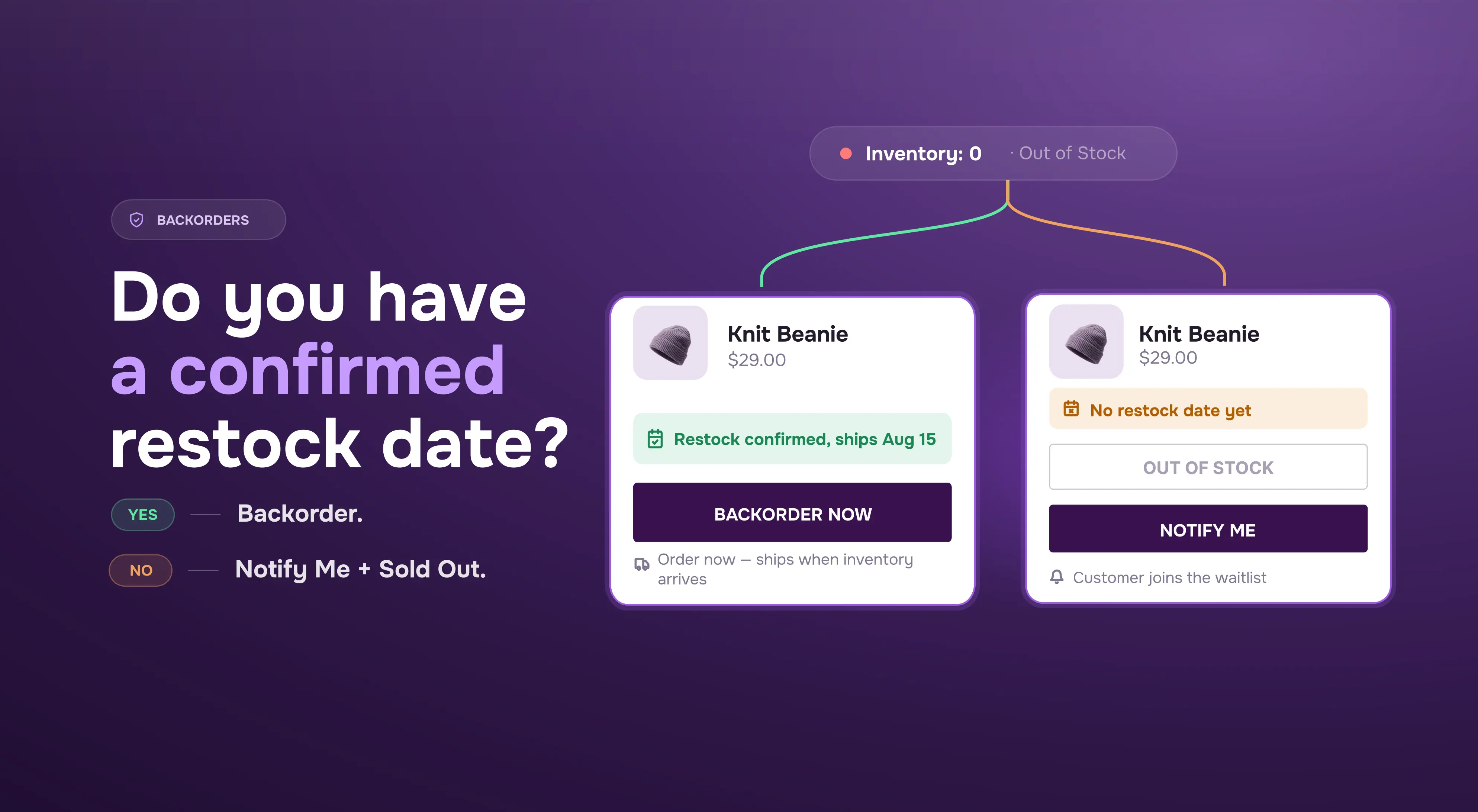
One question decides it: do you have a restock date you'd bet your reputation on?
On Shopify, backorders run through a single setting: the "Continue selling when out of stock" inventory policy, which you can enable per variant. Turn it on and customers keep checking out at zero inventory. Leave it off and the product shows as sold out.
One caveat, and it surprises a lot of merchants: Shopify adds no backorder messaging by default. With the setting enabled, the product page looks like any in-stock listing unless you — or a backorder app — add an "available on backorder" label and an expected ship date. Selling items customers don't realize are backordered is the fastest way to turn a stockout into a support queue.
So the rule:
- Confirmed ETA, allow the backorder and say so clearly.
- No ETA, mark it out of stock and capture demand another way.
What about back-in-stock alerts?
Marking a product out of stock doesn't have to mean losing the demand. A back-in-stock alert — set up via the "notify me when available" button on a product page — lets interested shoppers leave an email or phone number, then messages them automatically the moment you restock. Apps like STOQ can add notify-me buttons or forms and automated restock alerts without custom theme work.
Frequently asked questions about backorders vs out of stock
Does backordered mean out of stock?
In inventory terms, yes: a backordered product has zero stock on hand, just like an out-of-stock one. The difference is purchasability. Backordered items can still be bought because a restock is expected; out-of-stock items can't be purchased at all.
Can customers buy backordered products?
Yes — that's the defining feature of a backorder. Customers pay at checkout as normal, and the order ships when new inventory arrives. What keeps them happy in the meantime is a ship date that they saw before buying, and which updates if the situation changes.
Is backorder the same as preorder?
No. A preorder is for a product that hasn't been released yet; a backorder is for an existing product that's temporarily out of inventory. Both collect payment before you can ship. A preorder anticipates a launch, a backorder anticipates a restock. Read more about this in our preorders, backorders, and restocks difference guide.
Is it better to allow backorders?
Allow backorders when you have a confirmed restock date: revenue keeps flowing, and you capture demand competitors lose during their own stockouts. Without a reliable ETA, backorders backfire. Delays stretch, cancellations pile up, and trust takes the hit. In that case, out of stock with a restock alert is the safer play.
Can you cancel a backorder?
Yes, on both sides. Usually customers can cancel a backorder before it ships and expect a full refund, and merchants can cancel and refund if the restock falls through. On Shopify, backorders are ordinary orders — cancellations and refunds work exactly as they normally do.
How long do backorders take?
Backorder timelines vary by supplier, product, and shipping method. The right answer is whatever restock date you can confidently communicate.
A routine replenishment can mean days; a manufacturing or overseas shipping delay can mean months. Whatever the timeline, show it before checkout and update customers promptly if it slips.
What happens if a backorder takes too long?
Cancellations and chargebacks climb, and the goodwill you earned by keeping the product purchasable evaporates. If a backorder slips past its promised date, notify customers before they ask, offer a choice — keep waiting, swap for an alternative, or refund — and consider switching the product to out of stock with alerts until your supply chain steadies.
Should I remove out-of-stock products from Shopify?
Usually not. An out-of-stock product page keeps its search rankings, backlinks, and traffic; deleting it throws all of that away and leaves broken links behind. Keep the page live, mark the item sold out, and add a back-in-stock alert so the traffic converts into a restock waitlist. Remove or redirect pages only for products that are permanently discontinued.
The takeaway
If you have a reliable restock date, use STOQ to make backorders clear with preorder/backorder messaging. If you don’t, use STOQ back-in-stock alerts to capture demand until inventory returns.
For the deeper mechanics of enabling and managing backorders on your store, start with our complete guide to Shopify backorders.
Already using STOQ? Here's how to set up automatic restock alerts for out-of-stock products.

Rajat is CMO at Artos Software, leading growth for STOQ and our portfolio of Shopify apps through SEO, content, partnerships, and AI-driven marketing.