What to do when customers order in-stock + preorder products together
Quick answer
When a customer orders in-stock and preorder items together, you have four options: split fulfillments (ship separately, same order), separate orders (force two checkouts), ship together (hold everything), or block mixed carts (prevent at checkout). Each has trade-offs around customer experience, operational complexity, and cost.
Choose your path:
- Help me decide which approach fits my business (strategic—keep reading)
- I've already decided—show me setup steps → [Complete setup guide in help center]
Below: Why this matters, real merchant scenarios, and how to choose your approach.
Picture the Scene: Monday morning, 9:47 AM
Your customer ordered two items Monday. One's been sitting in your warehouse for weeks and is ready to ship, while the other won't arrive from your supplier for two more weeks. For many merchants, the timeline looks like this:
Day 1: Order placed. Customer excited.
Day 3: "Preparing shipment..." but only for the in-stock item.
Day 5: Customer asks: "Why hasn't my order shipped?"
Day 7: You explain the preorder delay. Customer confused—they didn't realize one item was a preorder.
Sound familiar?
This is the mixed cart dilemma, and it shows up in your inbox more often than you'd like. One merchant put it this way: "How do we deal with clients who order a preorder product and instock products too?"
The answer isn't simple because there's no universal "right" approach. It depends on your products, your fulfillment capacity, and what your customers value most. Some merchants prioritize speed by shipping what's ready now and dealing with the rest later. Others prioritize simplicity—everything ships together, even if it takes longer.
In this article, we’re gonna look at how four real-life Shopify merchants (and STOQ users) solved this problem, and how to figure out which approach fits your business.
But first, let’s clarify exactly what we’re talking about here…
What are mixed cart orders (and why are they a problem?)
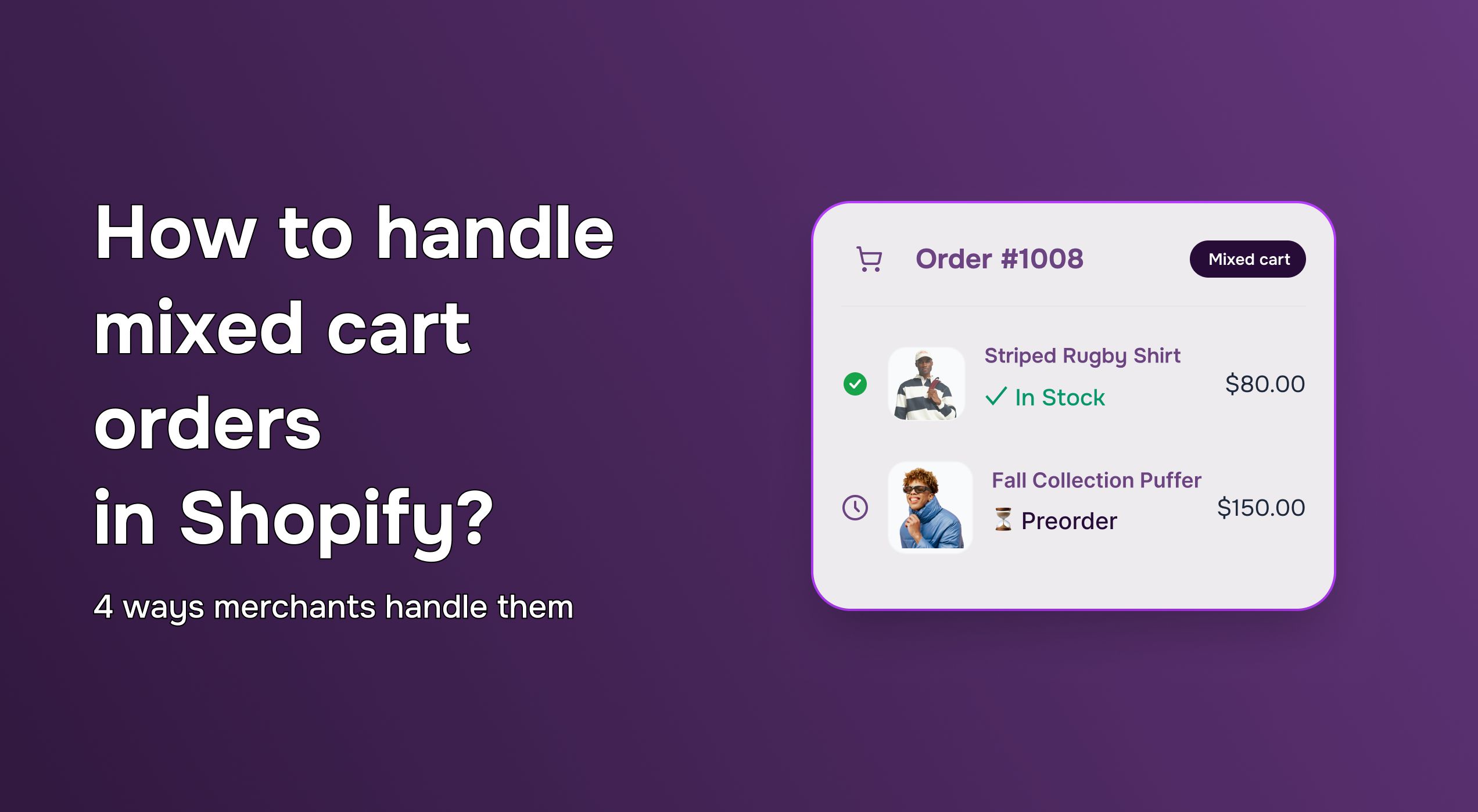
A mixed cart order is when a customer checks out with both in-stock items (ready to ship now) and preorder items (shipping later) in the same transaction. They pay once. They get one order confirmation. But your fulfillment timing doesn't align.
Let’s consider some hypothetical examples from different ecommerce niches:
- A fashion brand: Customer orders a current-season dress (ships today) + next-season jacket (ships in six weeks)
- A furniture maker: Customer orders throw pillows (ships today) + a custom sofa (eight-week lead time)
- A gift box company: Customer orders a set where three items are in stock and one is backordered
The core tension: Your customer expects one cohesive experience, but you're managing two different fulfillment timelines.
The four approaches to handling mixed cart orders (with real examples)
Approach 1: Ship what's ready, rest comes later
What this looks like:
In-stock items ship now. Preorder items ship when they arrive. Both stay on the same order, but the customer gets two shipments with two tracking numbers.
One STOQ customer, a seasonal apparel brand, does this. When customers order from both their current collection and next season's preorders, they ship the in-stock items immediately. "Customers get what they can wear now," their founder explained, "and they're usually fine waiting for the preorder piece since they knew it was coming later."
This works when:
- Your customers value getting something quickly over waiting for everything
- You have the logistics to handle split shipments
- Orders are high enough value that customers don't mind waiting for part of it
The tradeoff:
Customers sometimes get charged shipping twice. This happens in two situations:
- Different shipping profiles: If your preorder products and in-stock products use different Shopify shipping profiles, Shopify calculates separate rates for each.
- "Specific date" delivery setting: When you set your STOQ preorder to "Specific date" (instead of "ASAP"), Shopify treats it as a scheduled fulfillment and creates a separate shipping group—which triggers another shipping charge.
One merchant asked: "We noticed that when our customers cart has a pre-order and a regular product, we charge the shipping twice, is that correct?"
The fix: Use the same shipping profile for all products, and set your STOQ delivery type to "ASAP" instead of "Specific date." Complete troubleshooting guide here
When to choose: You're an established brand with solid fulfillment operations, and your customers care more about getting items quickly than receiving everything in one box.
Setup guide: How to enable split fulfillments →
Approach 2: Make them check out twice
What this looks like:
The customer has to place two separate orders—one for in-stock items, another for preorder items. Two order IDs. Two payment transactions. Complete separation.
Another STOQ client, a custom furniture maker, uses this approach. Their ready-made decor (lamps, pillows, small tables) ships within days, whereas their made-to-order furniture takes 6-8 weeks. They force customers to check out separately for each category.
"It's more friction upfront," they admitted, "but it's crystal clear. Customers know exactly what they're getting when, and we don't have to explain why part of their order is delayed."
This works when:
- You want complete operational separation between in-stock and preorder workflows
- Your preorder process is fundamentally different from regular orders (different pricing, different deposits, different timelines)
- You're willing to accept some cart abandonment in exchange for complete clarity
The tradeoff:
Higher abandonment. Some customers won't complete both checkouts—they'll buy the in-stock item and skip the preorder, or vice versa.
The key distinction:
Merchants often confuse this approach with split fulfillments (Approach 1). But they’re actually totally different. Split fulfillments = one order, two shipments. Separate orders = two orders, two checkouts, two shipments.
When to choose: You're a made-to-order or custom business where preorders are fundamentally different to regular sales, and you're willing to trade some convenience for operational clarity.
Approach 3: Hold everything untill it's all ready
What this looks like:
In-stock items sit in your warehouse until the preorder items arrive, then everything ships together in a single package. One shipment. One tracking number. Longer wait.
This is the approach taken by a STOQ client that sells gift boxes. They offer curated sets where every item matters—and the unboxing experience is part of the product. So when one item in the set is backordered, they hold the entire order.
"Our customers are buying a moment," they explained. "They want to open the box and have everything there. Receiving it in pieces ruins that."
This works when:
- Your products are meant to be experienced together (gift sets, outfit sets, curated collections)
- Your customers value the complete experience over speed
- You have low inventory holding costs (or can absorb them)
The tradeoff:
- Inventory holding costs: Those in-stock items are taking up warehouse space for weeks (or months).
- Customer frustration with preorder delays: If your preorder shipment gets delayed, the in-stock items are "held hostage"—and customers get annoyed they have to wait for products that are ready to ship.
When to choose: You sell products that are meant to be experienced as a complete set, and your customers explicitly value that cohesive experience over getting things quickly.
Setup guide: How to hold all fulfillments →
Approach 4: Don't let shoppers place mixed orders
What this looks like:
Your system prevents customers from adding in-stock and preorder items to the same cart. They have to choose: buy all in-stock OR all preorder. No mixing.
A sneaker brand that uses STOQ takes this approach around limited edition drops. "Launch week is chaos," their ops lead said. "We block mixed carts during the drop, then unblock once things stabilize. It keeps fulfillment simple when we need it most."
This works when:
- You're running a high-stakes launch and can't afford fulfillment mistakes
- You have a small team that can't handle split fulfillment complexity
- You're willing to limit what customers can buy together in exchange for operational simplicity
The critical limitation (and why merchants get surprised):
Express checkout bypasses this block. Shop Pay, Apple Pay, Google Pay, and PayPal Express let customers skip the cart entirely and go straight to checkout—which means your mixed cart block never gets a chance to run.
The lead engineer at one of our clients explained it this way: "Apple Pay (and Google Pay, Shop Pay, PayPal Express) buttons let the customer skip our mixed cart protection, unfortunately, as it directly triggers a checkout instead of modifying the cart."
Another merchant discovered this the hard way. They had the block enabled, but customers using Shop Pay were still checking out with mixed carts. "I thought it was broken," they said. "Turns out express checkout just... bypasses the whole thing."
The workaround: Disable express checkout buttons on your preorder product pages. Yes, this removes convenience for some customers. But if you need strict enforcement of the mixed cart block—especially during a launch—it's the only reliable way.
Learn more: How to disable express checkout for preorders →
When to choose: You're launching something high-stakes (limited edition, big press moment, presale) and need to minimize fulfillment complexity, even if it means limiting customer choice. Many merchants use this solution temporarily to block mixed orders during a launch, then switch to split fulfillments once operations stabilize.
Setup guide: How to block mixed carts →
How to decide
Here's what to ask yourself:
- How complex is your fulfillment operation right now?
Small team, tight on resources → Approach 3 (hold everything) or Approach 4 (block mixed carts)
Established fulfillment team → Approach 1 (split shipments) or Approach 2 (separate orders) - What do your customers value more—speed or simplicity?
Speed → Approach 1 (split fulfillments)
Simplicity → Approach 3 (ship together) - Are you launching something high-stakes?
Yes → Start with Approach 4 (block) during launch, then switch to Approach 1 after things stabilize - Can you afford to hold inventory?
No → Don't use Approach 3
Importantly, don’t forget that your strategy can change. Many merchants start strict (Approach 4) during launches, then shift to flexible (Approach 1) once operations stabilize. You're not locked in.
Best practices for handling mixed cart orders
After watching hundreds of merchants navigate this, here's what makes the biggest difference:
- Set expectations before checkout.
Add estimated ship dates to your product descriptions. "Ships in 6 weeks" is clearer than "Preorder now." Confusion at checkout is cheaper to prevent than refunds after. - Use STOQ's shipping message field.
Configure fulfillment messaging in your preorder offer. The customer should know what they're getting into before they hit "Place Order." - Test your setup.
Place test orders. See if you're charging shipping twice. See if customers know what's happening. Ten minutes of testing saves hours of support emails. - Communicate when things go wrong.
If your preorder shipment gets delayed, email customers before they email you. Trust is built in the moments when things don't go as planned.
Ready to handle mixed carts?
Already using STOQ?
→ Configure your mixed cart strategy in STOQ
New to STOQ?
→ Install STOQ and set up your first preorder offer
Need help deciding?
→ Read the complete mixed cart setup guide in our help center
Related questions
Can I change my approach to mixed cart orders after launch?
Yes. You can switch between these approaches anytime in STOQ settings. Many merchants do.
What if my preorder gets delayed?
Communicate immediately. Offer options: wait, refund, or swap for an in-stock alternative. The customer who finds out from your email is less frustrated than the one who finds out when they check the tracking.
Do mixed cart orders have higher refund rates?
Yes—usually because of expectation mismatch. You can reduce returns through effective upfront communication: make sure customers know what they're buying and when it ships.

Anaam heads Merchant Success at Artos Software, working with Shopify merchants to help them unlock the full potential of STOQ and our other apps.