Controlling preorder limits at the variant level on Shopify

Quick Summary: If you’re setting up preorders on a product with multiple colors, sizes, or other variants, the limits you set should match how your inventory is going to be coming in. This guide walks through how to think about that, and how it works in STOQ.
Say you’re a clothing brand. You’ve just spoken to your supplier about a hoodie and they’ve shared hard numbers for each color variant: 200 of the navy, 80 of the white, 50 of the olive. If your preorder setup doesn’t reflect this, you risk overselling – and that’s bad. Instead, you want the option to express inventory limits by variant, exactly as the manufacturer has given you, for every product you sell.
Oversold preorders = broken promises
Every variant that goes on preorder carries a weight of customer expectation. The customer who preorders the olive colorway expects it to arrive within the timeline you set. Variant-level limits help you deliver on those expectations, because you only sell what you can actually fulfill, per variant, before a single order goes out.
All of which means you can run preorders with confidence – no more panicked emails to customers explaining unplanned delays.
Boosting conversions through FOMO
Beyond the most obvious reason to set preorder limits (reducing the risk of overselling), adding preorder limits can have an underrated secondary benefit: increasing your conversion rate.
It’s all about building urgency and scarcity. When you add a hard-and-fast limit for the number of available preorders, customers feel like they’re in danger of missing out, which encourages them to act fast and buy now.
All you need to make this happen is an effective way to communicate the number of remaining preorders, such as a note or progress bar.

How this works in STOQ
STOQ supports variant-level preorder limits natively, including adding a note or progress bar to preorder offers. It’s quick and easy to set up, too. Inside the app, open your preorder offer and go to the Products section. Then find the “Limit” field and enter the maximum number of units of each variant you want to make available for preorder. Once your inventory is up to date, hit “Save” to apply the changes. Simple, huh?
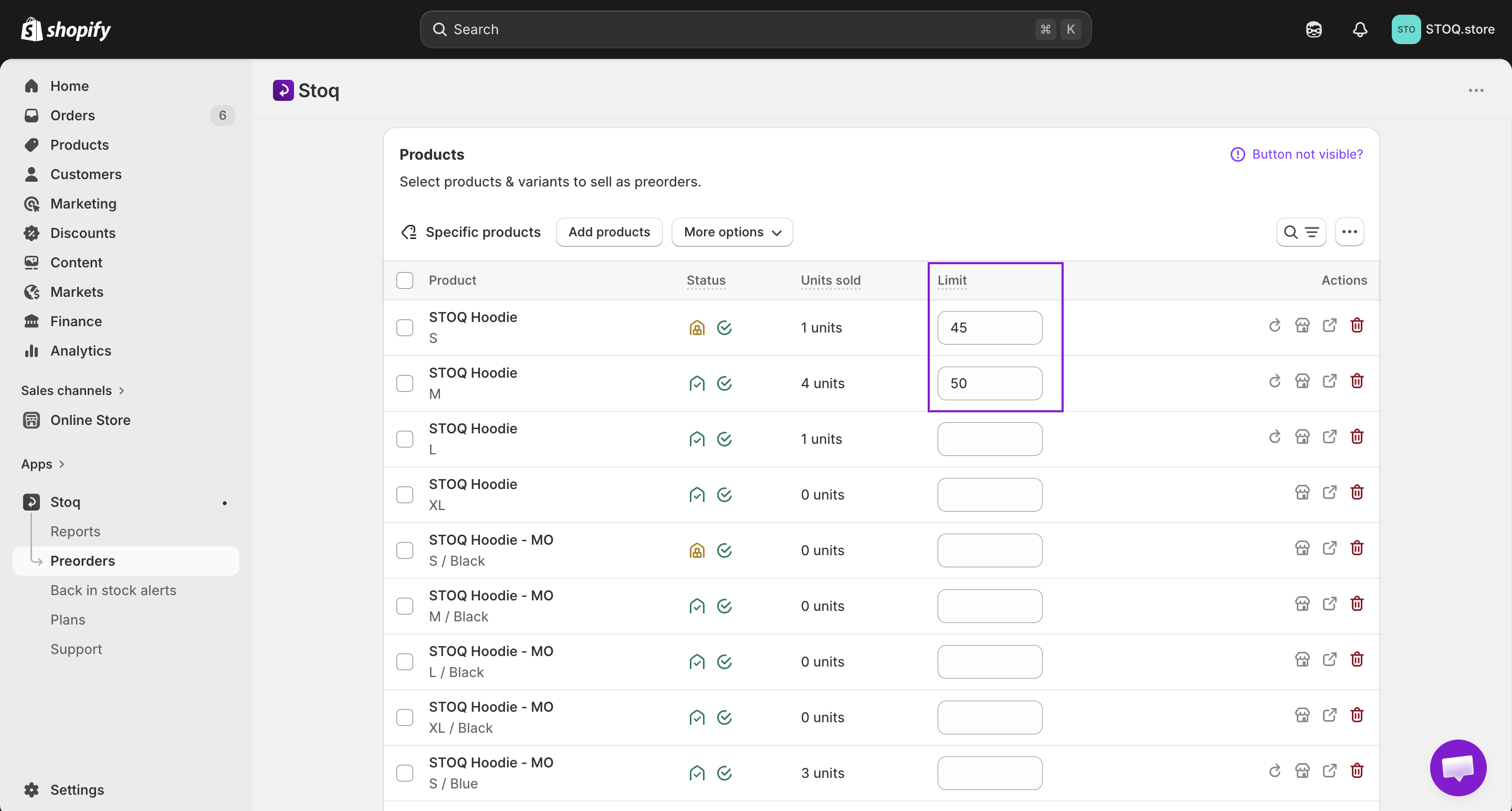
If you're ready to configure it now, check out our full step-by-step walkthrough: How to set up preorder limits in STOQ.
Final thoughts
There are plenty of things for Shopify merchants to worry about – but overselling doesn’t have to be one of them. When you set accurate preorder limits, you can’t sell more than the amount coming in, and products automatically move to “sold-out” status once the limit is hit. That way, you’re setting clear expectations and reducing complaints from customers who don’t receive their orders.
Not using STOQ yet? Start for free today

Rajat is CMO at Artos Software, leading growth for STOQ and our portfolio of Shopify apps through SEO, content, partnerships, and AI-driven marketing.