Shopify preorder deposits: How to accept partial payments for preorder products
Gone are the days when running out of stock meant losing sales. With preorder deposits, you can keep revenue flowing even when products aren't immediately available. But here's what most merchants don't realize: preorder conversion rates range between 10-20%, significantly outperforming the typical ecommerce conversion rate of just 2-4%. When you add partial payment options, those numbers get even better.
Preorder deposits allow your customers to reserve products by submitting a partial payment, generally 20-50% of the total cost, with the remainder owed when you're ready to ship.
For Shopify merchants faced with out of stocks, limited editions, or made-to-order types of products, this can mean the difference between capturing revenue and saying goodbye to it.
Why accept preorder deposits instead of full payment?
Asking customers to pay the full price upfront for a product they won't receive for weeks creates friction. Preorder deposits solve this problem by lowering the barrier to purchase. Here's why they work:
1. Manage shopper hesitation
Small preorder deposits reduce the friction of the first ‘yes.’ Behavioral-economics shows that once a customer makes even a minimal upfront payment, they’re far more likely to complete the purchase later. This makes low-value deposits especially effective for shoppers who are discovering your brand for the first time.
2. Test demand before committing
Rather than risk your inventories, utilize a deposit to gauge interest. If preorder interest fails to meet your target, you can either adjust your quantity of production or you can cancel the run, saving you from nightmares of overstock.
3. Reduce refund volume
Production delays happen. When customers have only paid a deposit rather than the full amount, they're more likely to wait it out instead of requesting a refund.
4 . Boost cash flow predictability
Deposits give you immediate working capital to fund manufacturing or restock inventory, while the remaining balance helps cover shipping and fulfillment costs when products are ready.
Breaking Shopify’s preorder payments limits with STOQ
Shopify technically lets you sell products that are out of stock, but the platform has no true native preorder system. There’s no support for taking deposits, no way to collect the remaining balance, and no simple way to label something as a preorder without editing theme code. Most brands end up juggling manual inventory updates, unclear customer messaging, and broken experiences that create support issues and chargebacks.
STOQ removes all of these limitations by giving you a dedicated preorder engine that actually fits how modern brands sell. Instead of stitching different flows, STOQ automates preorder payments, deposits, communication, and inventory so you can run preorder campaigns without friction.
1. Flexible deposit and partial payment options
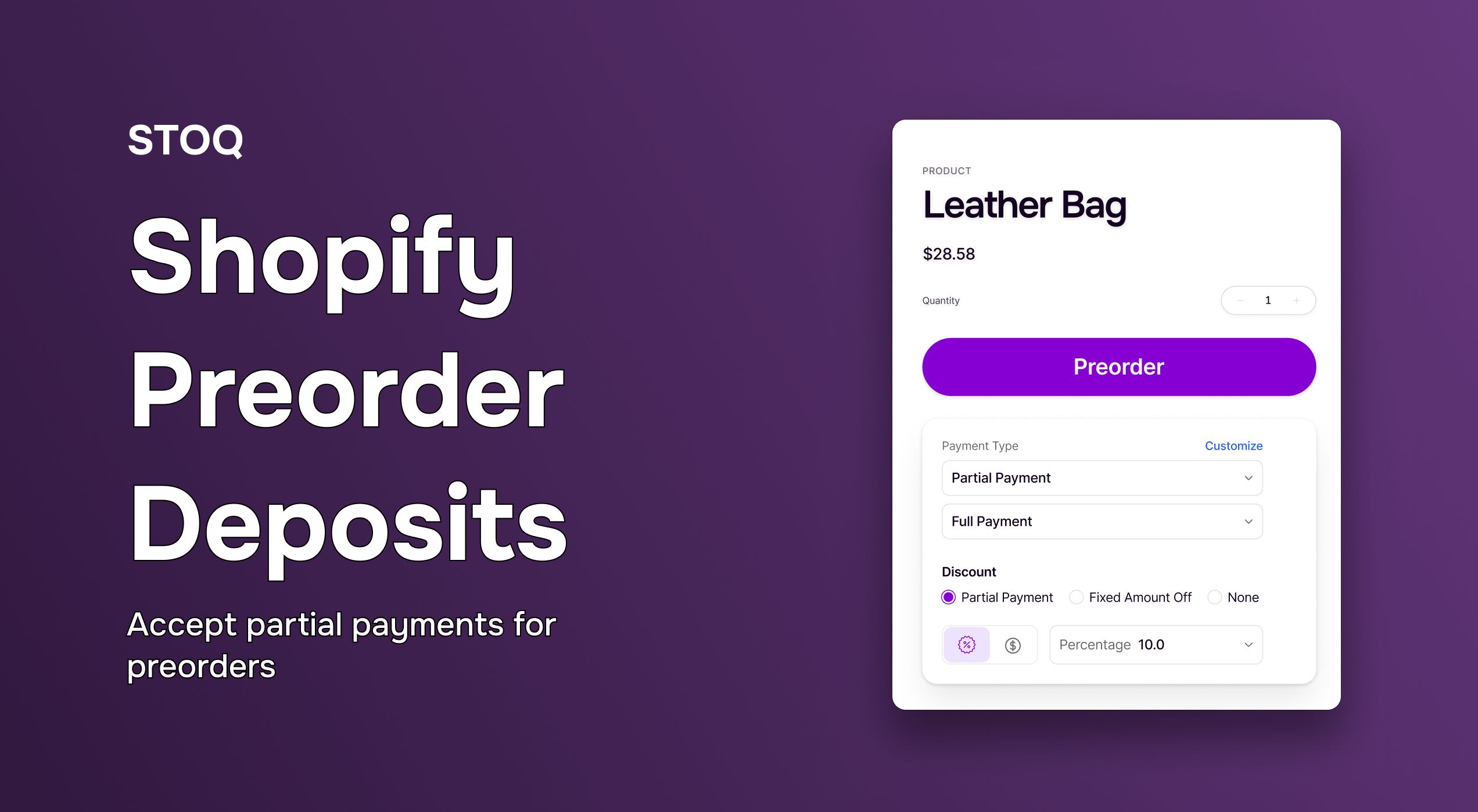
Shopify checkout only supports full payment upfront. STOQ fixes this by letting you set deposits as either a fixed dollar amount (for example, $50) or a percentage of the product price. Customers pay the deposit at checkout, and STOQ automatically charges the remaining balance once the item is ready to ship.
2. Option to pay in full or use partial payments at checkout
STOQ supports both by letting shoppers choose between paying the full amount upfront or using partial payments. Those who prefer flexibility can place a smaller upfront payment, while others can settle the entire order immediately. This dual option boosts conversion and makes preorder purchases feel more accessible without complicating the checkout flow.
How to accept preorder partial payments on Shopify (The easy way)
If you need help setting up a full preorder offer in STOQ, you can refer to our step-by-step setup guide. Below, we’ll focus on deposits and partial payments.
Step 1: Customize your preorder widget
Open your preorder campaign inside STOQ and enable the preorder widget. This replaces the default Add to Cart button with your preorder button and lets you style it to match your brand. Here, you can also add expected shipping dates or availability information. This lets the customers know when to expect the order.
.jpg)
Step 2: Configure partial payment settings
In the payment settings, activate the option to offer both full payment and partial payment at checkout. If you choose partial payments, STOQ lets you decide between a fixed upfront amount or a percentage of the product price. The widget automatically displays the deposit amount to customers so they understand what they’re paying now and what they’ll be charged later. You can also choose when the remaining balance is collected.
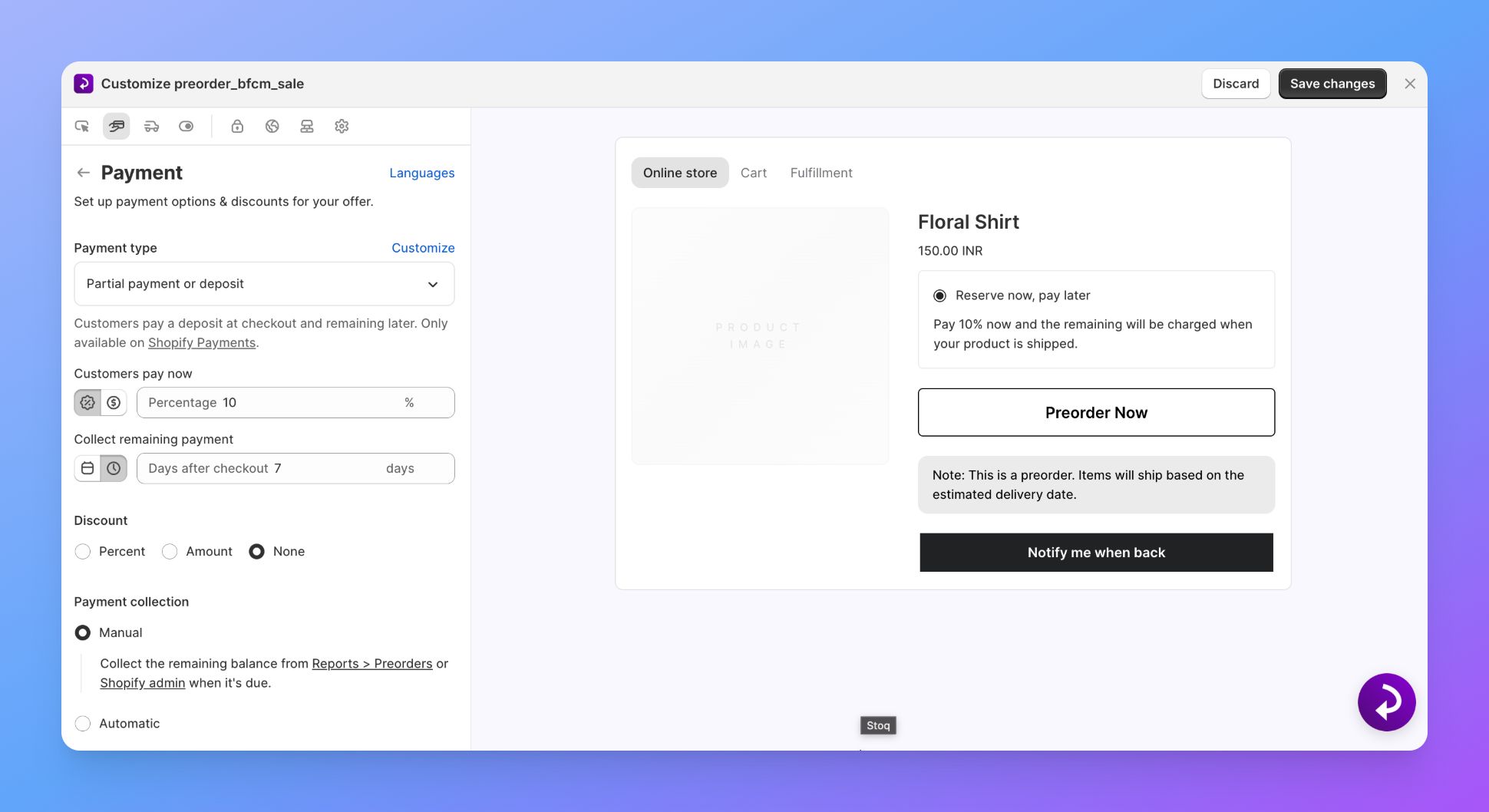
Most brands charge the final amount when the product is ready to ship, but you can schedule it for a specific date if needed.
Step 3: Add clear shipping and fulfillment details
Because partial payments involve a second charge, it’s important that customers understand the timeline. Add your estimated shipping date, production timeline, or any other relevant details. STOQ displays this information on the product page, in the cart, and in confirmation emails so expectations are set from the beginning.
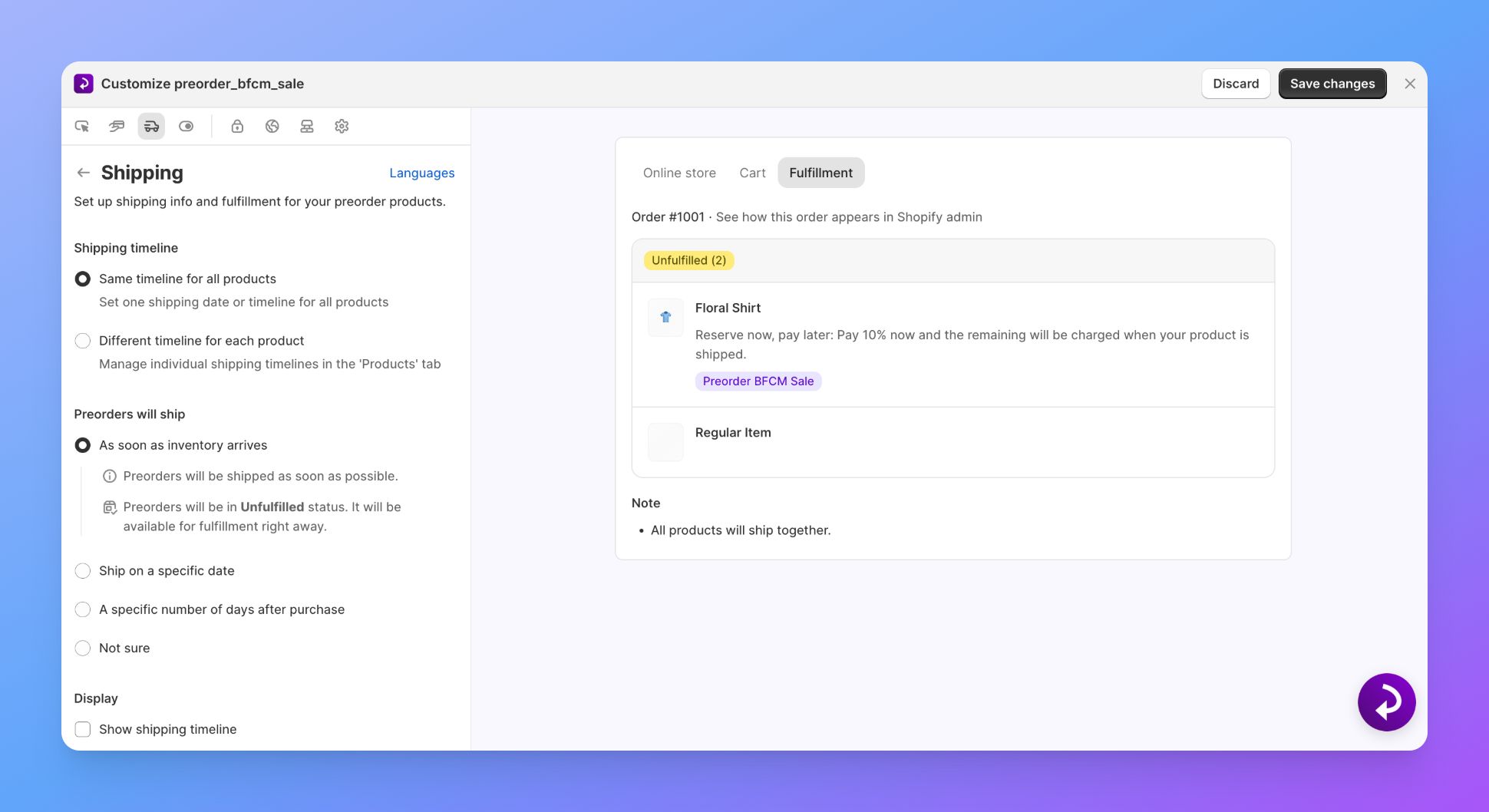
Step 4: Apply your payment settings to the right products
Once your partial payment rules are ready, choose the products or variants that should use them. You can apply the same settings to a single product, a full collection, or an entire preorder launch. After saving, the preorder widget will automatically show customers the option to pay in full or pay partially.

How to know if your preorder deposits are working
Setting up preorder deposits is only the first step. To understand whether your strategy is effective, you need to measure performance across key metrics. These indicators help you validate demand, improve forecasting, and optimize your preorder experience.
1. Compare conversion rates
Analyze the conversion rate of deposit-based preorders vs. full-price preorders.
If significantly more customers complete checkout when deposits are available, it’s a strong sign that pricing hesitation was a barrier and deposits are increasing conversions.
2. Track refund rates and customer satisfaction
Look back on refund frequency, support tickets, and customer feedback. Higher-than-usual rates of refund indicate something might be wrong, such as shipping timelines communicated without enough clarity, misunderstandings because of delays, or misaligned expectations with the product.
If you clarify transparency and communication, you likely will see a reduction in refund requests.
3. Measure the impact on cash flow and forecasting
Evaluate how preorder deposits influence your cash flow stability and inventory planning. If deposit revenue reduces overstock or understock situations, it indicates your forecasting accuracy is improving due to preorder data.
4. Use analytics tools for deeper insights
Analyze data from Shopify Reports, Google Analytics 4, or from STOQ’s dedicated dashboard to understand:
- Which traffic sources convert best for preorders (email subscribers often outperform cold audiences)
- Average order value for preorder customers compared to regular buyers
- Products that generate the strongest preorder demand
- Performance of campaigns, landing pages, or pricing tests
5. Test and optimize deposit strategies
Start with a conservative deposit amount (typically 20–30%). Then experiment:
- High-ticket items may convert better with lower percentage deposits
- Trend-driven or impulse products may work well with small fixed deposits
- Niche products might require higher deposits to validate a serious buyer
Iterating with different amounts helps you identify the ideal deposit structure for each product category.
Start your preorder journey with STOQ
Preorder deposits benefit both customers and merchants. Shoppers secure early access with a smaller upfront cost, and you gain early revenue and demand validation before committing to inventory.
Test different deposit tiers to find what works best for your products. A fixed $25 deposit may suit a $100 item, while a 30% deposit might be better for higher-priced products. Let performance data guide your adjustments.
If you want to stop losing sales during out of stocks, STOQ makes preorder deposits simple. The app automates partial payments, handles remaining balance collection, and keeps customers informed from purchase to fulfillment. It scales easily from a single campaign to hundreds of SKUs.
Try STOQ free for 30 days and convert every out-of-stock moment into revenue.

Anaam heads Merchant Success at Artos Software, working with Shopify merchants to help them unlock the full potential of STOQ and our other apps.