How to collect the remaining payment for preorders - automatic vs manual
Asking customers to pay upfront fully for a preorder creates two problems for your store. First, many shoppers hesitate to commit months in advance, especially for higher-value products. Second, collecting the full amount early increases refund requests, chargebacks, and customer support load if timelines shift.
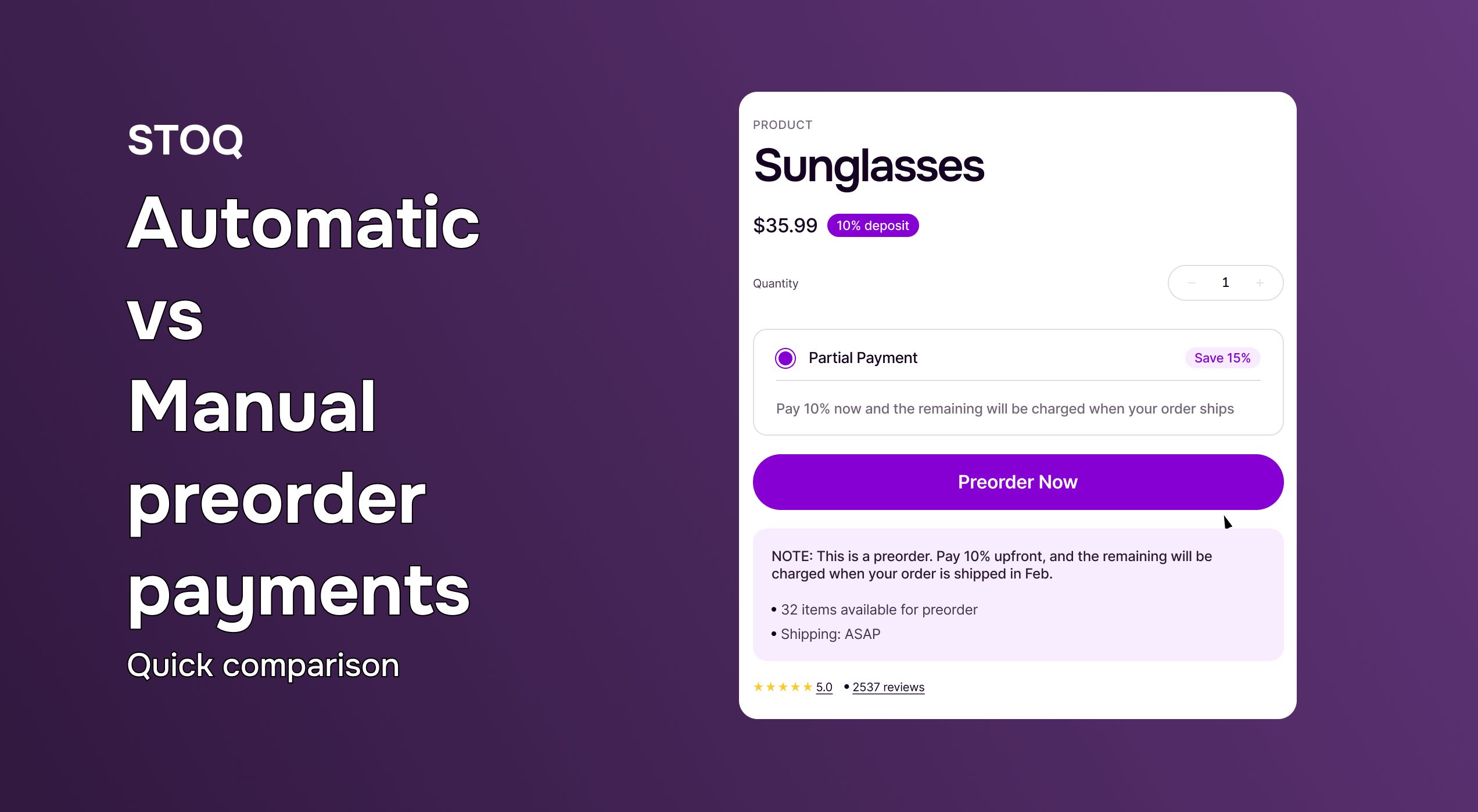
Using preorders with a small deposit can lift conversions by 10–20% because customers can commit without feeling overexposed, while you still validate demand early. Instead of charging the full price at checkout, you collect a deposit and charge the remaining balance closer to fulfillment. This lowers checkout friction, builds buyer confidence, and reduces risk if shipping timelines change.
Once merchants adopt this model, they can manage remaining payments manually using Shopify or automate the process with an app like STOQ.
Where merchants gets stuck and how preorder payments work on Shopify
Preorder payments come in two forms: partial payments (where you collect a deposit upfront and the balance later) or deferred payments (where you authorize the full amount but only capture funds when the product ships).
Here's what Shopify allows natively: payment authorization holds that expire after 7 days for most gateways. With a Shopify Plus plan, it can be extended up to 30 days. This creates a problem for preorders with longer lead times. Apps like STOQ extend this window through re-authorization, letting you hold authorization or collect deposits for weeks or months ahead.
Delaying payment capture makes preorders easier for customers to say yes to. When shoppers don’t have to pay the full amount months before shipping, they feel more comfortable placing an order. This often leads to higher conversions.
For your store, this approach brings in early cash through deposits, while lowering the risk of refunds or chargebacks if plans change. It also builds trust by showing customers you only charge in full when the product is ready, and helps you stay aligned with payment rules in regions like the EU.
Also read: How preorder apps turn out of stock products into sales
Automatic vs manual preorder payments: Quick comparison
When setting up preorders on Shopify, choosing between an automatic system and a manual workflow can make a major difference in efficiency. Here’s a quick comparison to help you decide which fits your store best.
How to set up automatic remaining payment collection with STOQ
If you already have your preorder offer set up, setting up automatic payment collection in STOQ is easy. You only need to adjust a few settings to collect a deposit upfront and charge the remaining balance later.
If you need help setting up a preorder offer first, refer to the Get started with preorders guide
Step 1: Open payment settings
From your STOQ dashboard, go to Preorders, open an existing offer, and switch to the Payment tab.
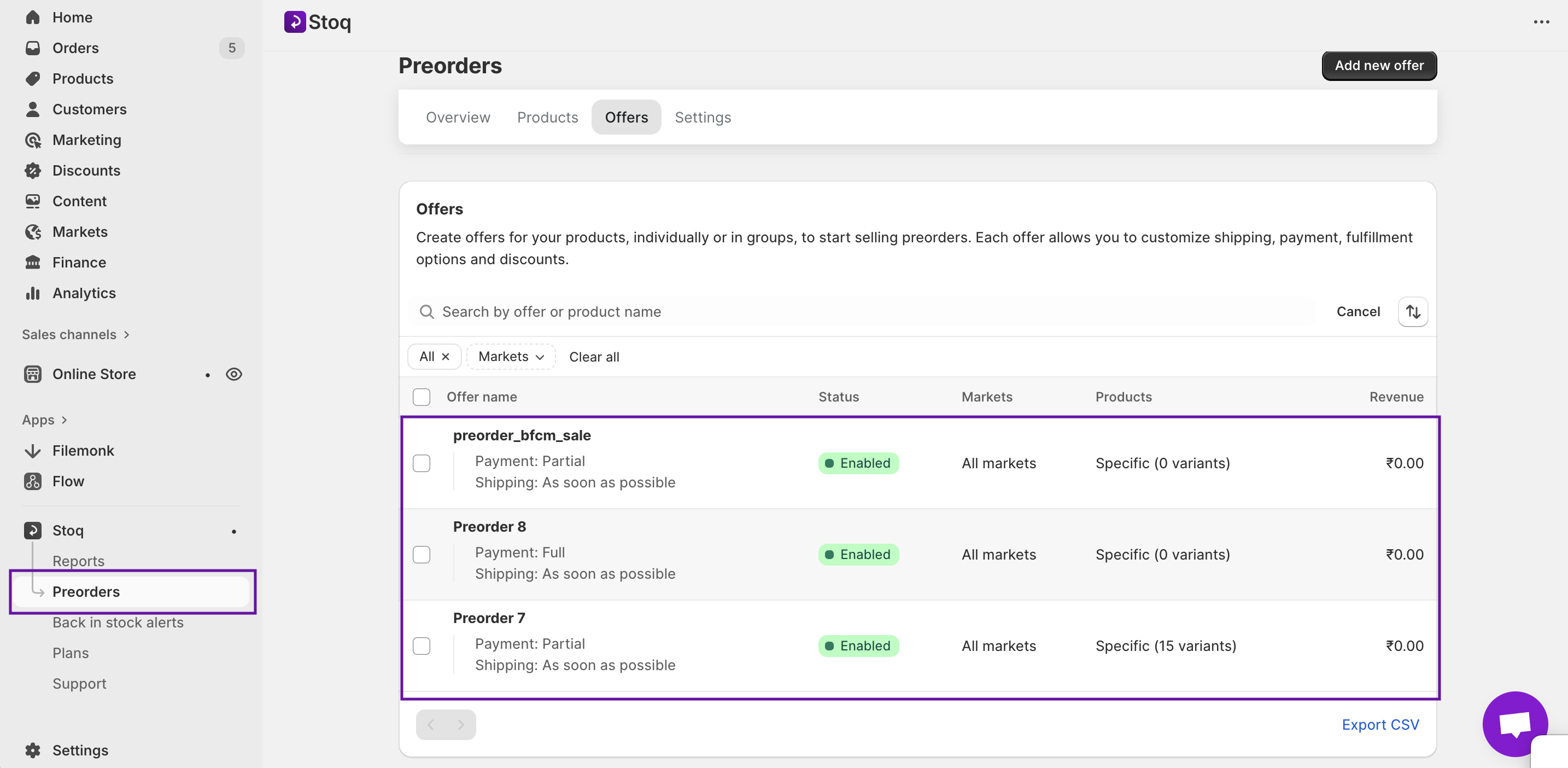
Step 2: Choose partial payment or deposit
Select Partial payment as your payment type. You can customize the label and description that appear in the payment widget. This way customers clearly understand the deposit terms.
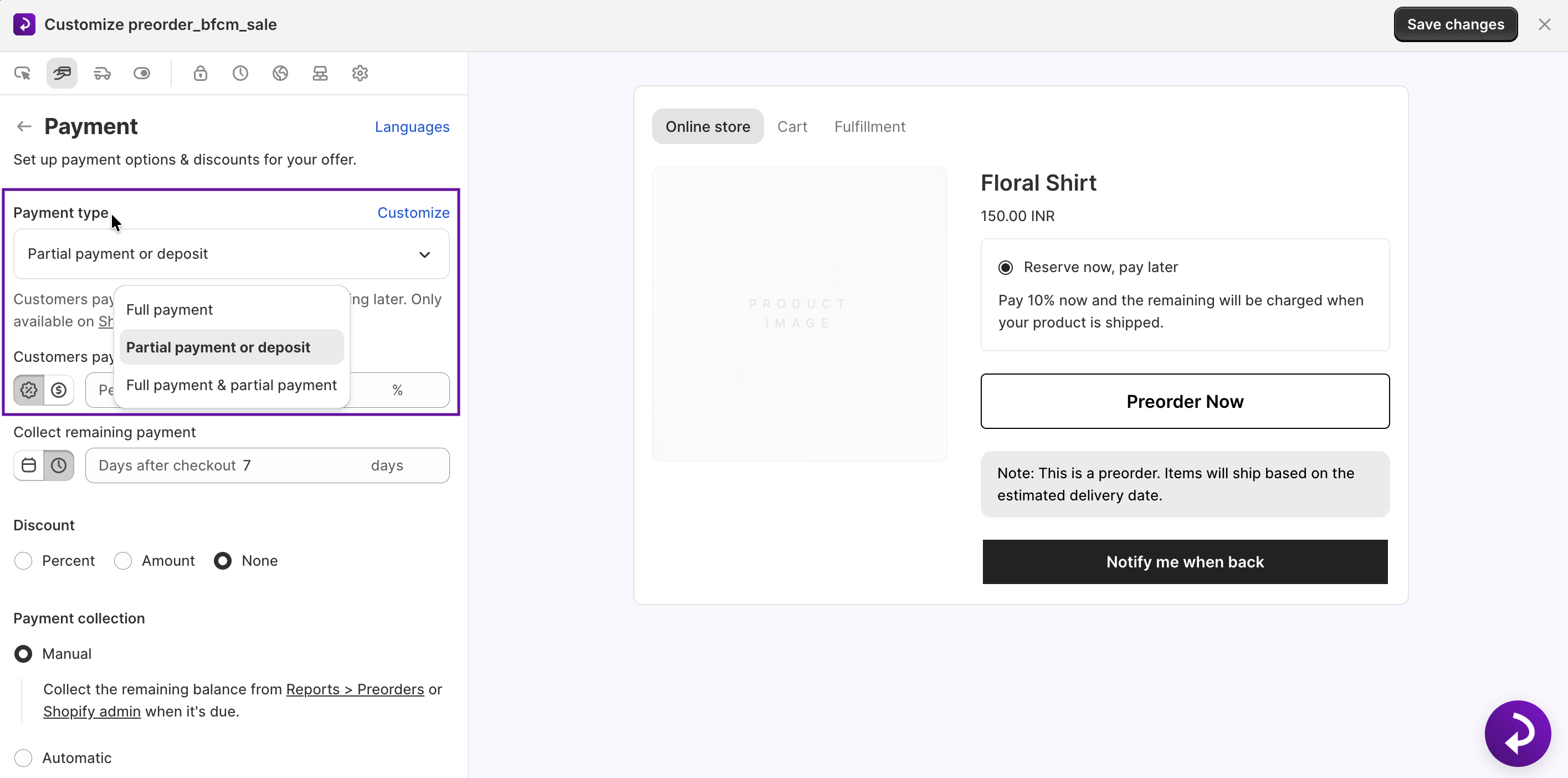
Step 3: Set the deposit amount
Choose either a percentage or a fixed amount to collect at checkout. Toggle between options using the icons beside the field.
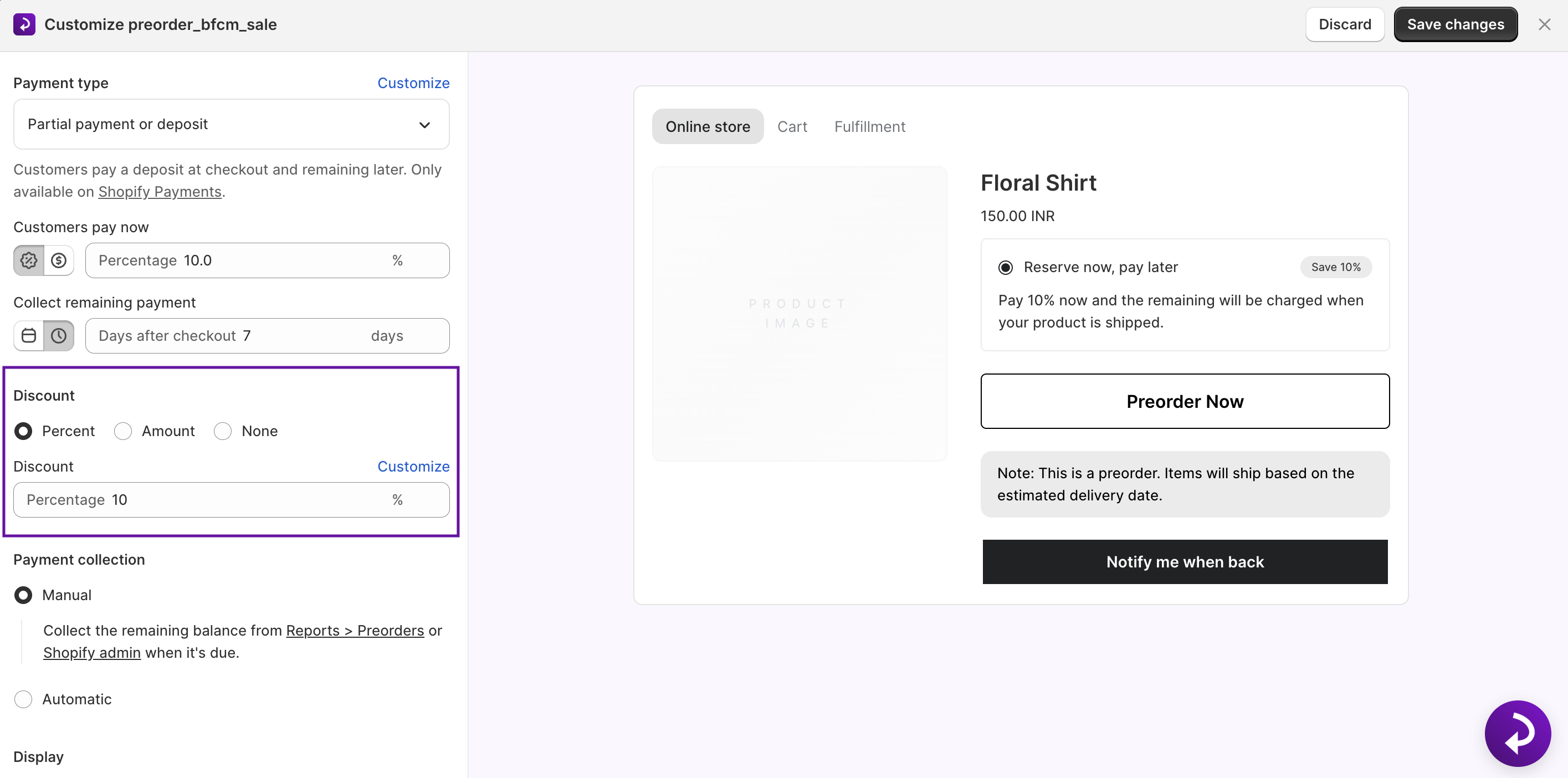
Step 4: Schedule the remaining payment
Choose when STOQ should collect the balance:
- A specific date (ideal for known ship dates)
- A set number of days after checkout (great for rolling timelines)
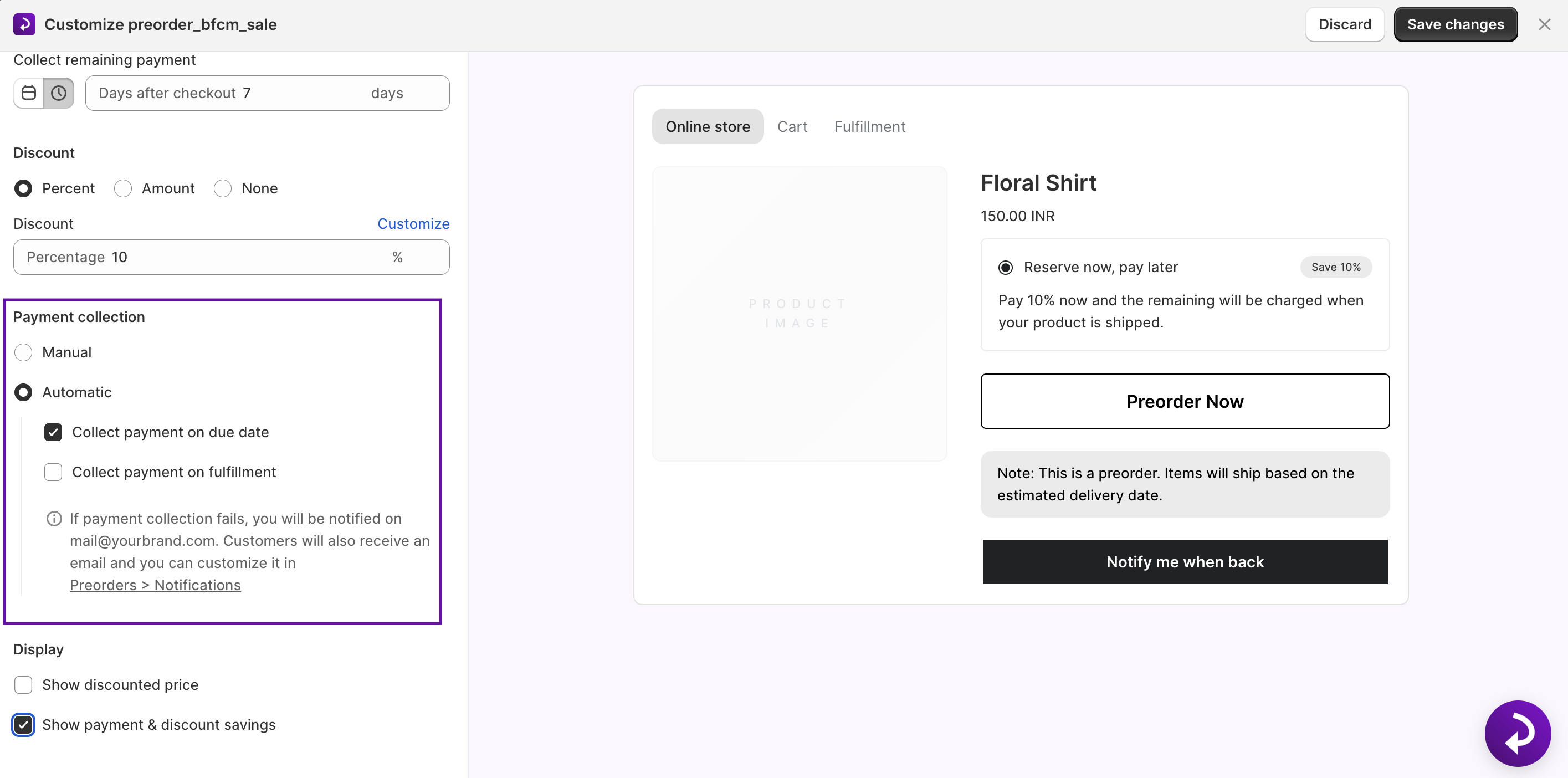
Step 5: Add optional preorder discounts
You can also offer incentives like:
- Percentage off (e.g., 10% early-bird offer)
- Fixed-amount discount
A custom discount badge is shown in the widget for the particular item.
Step 6: Enable the payment widget
Turn on Show Payment Options so customers see deposit terms and the remaining amount clearly on your product page.
Step 7: Save & go live
Hit the Save Changes button on the right top. STOQ will now:
- Collect deposits
- Send automated reminders
- Capture the remaining balance
- Handle all customer communication
Also read: How to partially fulfill an order on Shopify
How manual preorder payment collection works on Shopify
If you prefer managing preorder payments manually with Shopify’s built-in tools, here’s the simplified workflow:
Step 1: Create a draft order
Go to Orders → Create order. Add the preorder product and customer details. Under payment terms, choose Due later and enter your deposit amount.
Step 2: Send the deposit invoice
Shopify generates an invoice for the deposit using the Send invoice button. Email it to the customer so they can pay through the secure checkout link.
Step 3: Track order status
After the deposit is paid, the order appears as partially paid. You’ll need to manually track when the remaining balance is due.
Step 4: Invoice the remaining balance
When it’s time to collect the final payment, open the order → Collect payment → enter the remaining amount → send the invoice.
Step 5: Capture the payment
The customer pays through the link, the order updates to Paid, and you can fulfill it normally.
What You’re Taking On With Manual Preorders
- Creating individual invoices for each customer
- Manually tracking payment deadlines
- Sending your own reminder emails
- No automated flows or payment widgets on the product page
This works for low preorder volume, but becomes time-consuming and error-prone as soon as you scale or run preorders regularly.
Best practices for collecting remaining preorder payments without issues
Collecting remaining preorder payments smoothly is essential for customer trust and predictable cash flow. A clear, transparent process ensures buyers know exactly what to expect and reduces failed payments or disputes. Follow these best practices to streamline your preorder payment strategy and keep your operations compliant and reliable.
1. Communicate payment terms clearly
Show customers exactly how much they pay now and when the remaining balance will be charged. Avoid hiding details in your terms of service. Tools like STOQ display payment terms directly on the product page for full transparency.
2. Find the right deposit amount
A 25% deposit typically delivers the best conversion rate, low friction, and high commitment. Adjust based on your product’s price point:
- High-ticket items → lower deposit may work
- Lower-priced items → slightly higher deposit may be needed to cover production costs
3. Set realistic payment collection dates
Collect the remaining balance 1–2 weeks before shipping. This buffer lets you resolve failed payments early and ensures customers aren’t surprised at the last minute.
4. Automate your payment reminders
Manual reminders don’t scale. Automated emails ensure customers never miss a deadline and keep communication consistent. STOQ sends reminders automatically at predefined intervals.
5. Understand refund & regional regulations
Refund and preorder rules differ by region, so transparency is key:
- EU: Strict consumer protection laws. You must clearly show shipping timelines, avoid holding full payment too long, and provide refunds if delivery dates are missed. You can read further here.
- US (FTC): You must disclose accurate ship dates, notify customers of delays, and clearly communicate refund terms. You can get more insights here.
6. Legal compliance checklist
A compliant preorder setup requires clearly displaying estimated ship dates, honoring refunds when delivery windows are missed, following regional rules on holding or deferring payments, and keeping payment terms visible throughout the entire checkout process.
Also read: How to plan a custom landing page for preorders
Recover preorder revenue without the manual work
The choice between automatic and manual preorder payment collection comes down to scale and efficiency.
Manual methods give you control but require hands-on work for every order. They work for stores running occasional preorders with simple product catalogs.
Automatic solutions like STOQ eliminate the manual work while improving the customer experience. You set payment terms once, and the app handles deposits, reminders, and final payment capture. As your preorder volume grows, STOQ scales with you at no additional cost and effort.

Anaam heads Merchant Success at Artos Software, working with Shopify merchants to help them unlock the full potential of STOQ and our other apps.