How to add a free gift to a preorder launch on Shopify
A preorder asks your customer to commit before the product is ready to ship. Sometimes they pay upfront, sometimes a deposit, sometimes nothing until it ships, but they always wait.
A free gift is the oldest answer to that ask, and it still works. Game studios, beauty brands, and sneaker labels have spent years training buyers to expect a preorder bonus for committing early, and the same mechanic works for any Shopify launch. What makes or breaks it isn't the gift. It's the timing.
Quick answer: Yes, you can run a free gift with purchase on a preorder product in Shopify — you'll need a preorder app plus a gift app that survives preorder selling plans (we cover a tested app below). The setup takes minutes. The decision that deserves your attention takes longer: does the gift ship now, or with the preorder?
What a free gift does on a preorder
A free gift on a regular order rewards spend. On a preorder, it rewards commitment. The customer is committing to your product weeks before it exists on a shelf, often with money down, and the gift acknowledges that. It also gives shoppers a reason to buy during the launch window instead of bookmarking the page and waiting for "back in stock" so more orders come in while the campaign is live, when you can still plan production around them.
One constraint shapes everything else: the main product ships later. Every choice about the gift (what it is, what unlocks it, when it arrives) is really a timing choice. Get the timing right and the gift feels like a bonus. Get it wrong and it becomes the reason your inbox fills with "where's the rest of my order?"
Decide the gift structure first
Before you open any app settings, decide what triggers the gift, when it ships, and how long the offer runs. These three decisions drive the setup, the page copy, and the fulfillment plan.
What triggers the gift?
Two structures fit a preorder launch.
Buy the preorder product: The gift is attached to the launch product item itself. Anyone who preorders gets it. This is the classic preorder bonus: simple to explain, simple to fulfill, and it keeps the launch product the hero.
Hit a spend threshold: The gift unlocks when the cart passes a set value, which rewards customers who add more to their order alongside the preorder.
If your goal is to reward the preorder itself, use the first. If your goal is to grow the order around the preorder, use the second.
When does the gift ship?
This is the core decision you should think about. There are three options, and each with a real cost.
Ship the gift now: The customer gets something in hand while they wait. That does more work than it looks like: it confirms the order is real, gives them something to unbox and post, and makes a six-week wait feel shorter. The cost: you're now running a split shipment, with the packing and postage cost that comes with it.
Ship the gift with the preorder: One box, one date. Cheaper, and simpler to pack. The trade-off: nothing arrives until the ship-by date, so the gift does its work at unboxing instead of during the wait. If you promise "ships together," make the promise enforceable — STOQ's Hold all fulfillment option (Preorders → Offers → Shipping) holds the whole order until the preorder is ready.
Make the gift digital: A setup guide, a download, an extended warranty registration. It arrives instantly, and costs nothing to fulfill. What it gives up is the physical moment; a PDF doesn't get photographed next to the product.
There's no universal right answer. If your wait is long, shipping something now earns its cost. If margins are tight, ship together and say so clearly.
Is the gift itself in stock?
A gift that sells out mid-campaign recreates the exact problem your preorder was built to avoid, it looks like a broken promise instead of a stockout. If the gift is a product you sell rather than a giveaway item, check its stock position the way you'd check any component before a launch.
How long does the offer run?
Two clean options: a launch-window deadline ("free gift on all preorders through Nov 15") or while gift stock lasts ("free gift with the first batch"). Pick one and state it on the page. The offer window is what gives customers a reason to order this week instead of next month, so treat the end date as part of the offer, not fine print.
Setting up a free gift on a preorder product
You need two layers: preorder on the launch product, and the gift offer on top of it. STOQ handles the preorder layer. For the gift layer, we are using BOGOS, the steps below use the same pairing.
1. Enable preorder on the launch product in STOQ
Set the payment model (full payment, deposit, or partial), the ship-by date, and a unit cap that matches what you can actually fulfill. First preorder? Follow the video tutorial below:
2. Create the gift offer in BOGOS
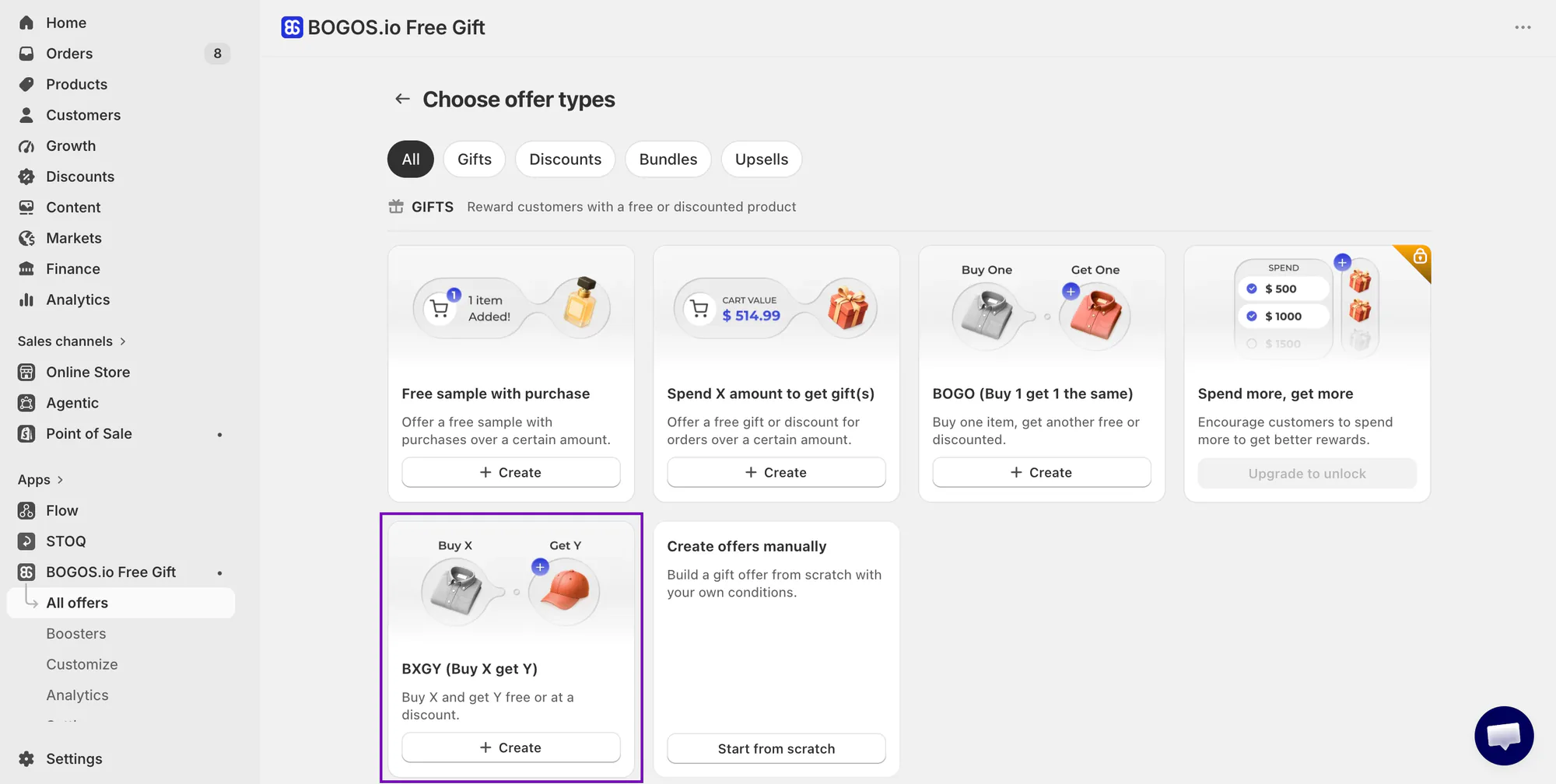
Go to All offers → Create a gift offer. We are choosing Buy X Get Y for this example. Give it an internal name, a customer-facing title, and a start and end time — that end time can be your launch window, so set it here rather than planning to remember it later. For the main condition, choose a specific product and select the preorder product.
3. Select the gift item
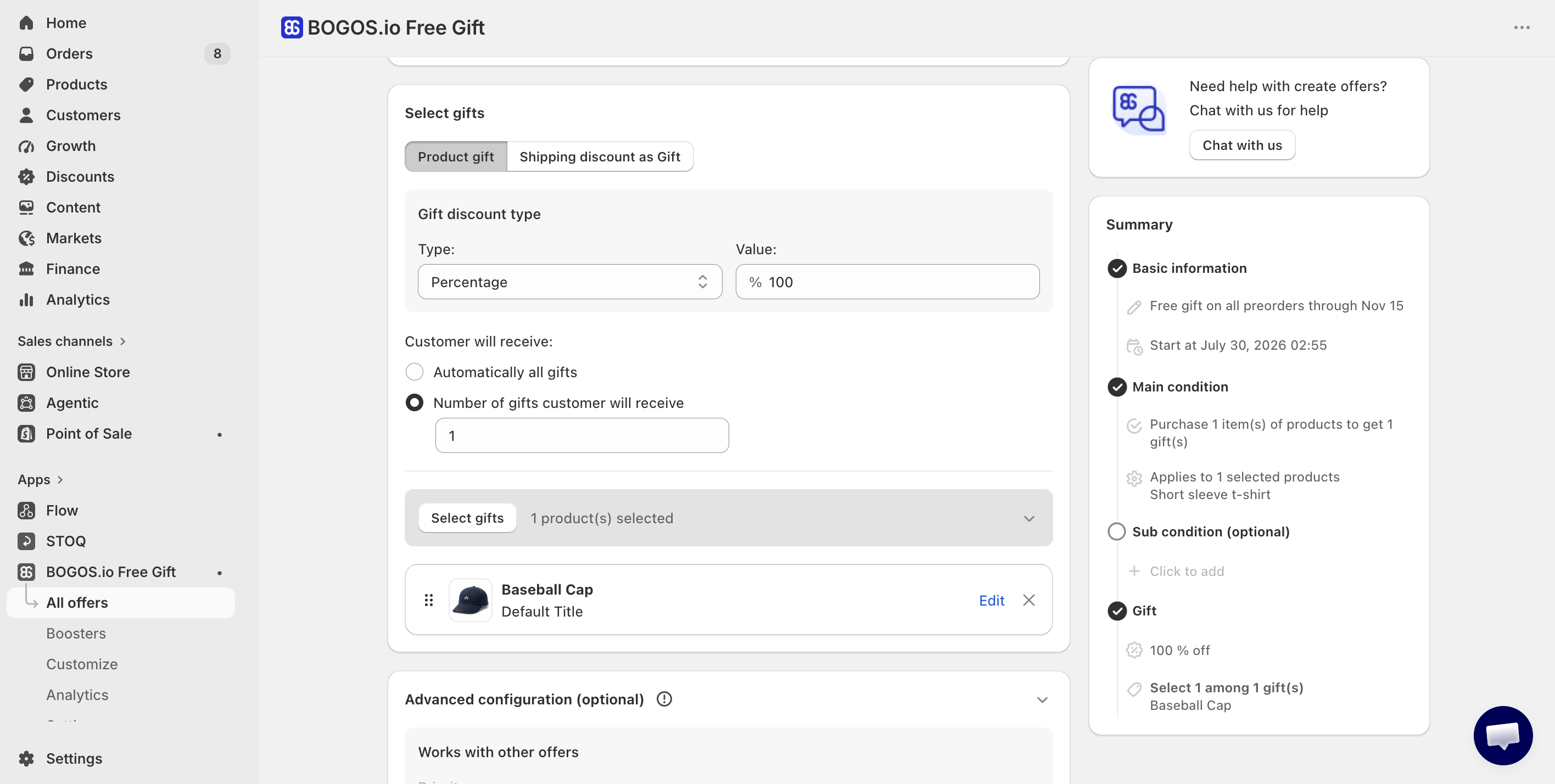
Pick the gift product and set the discount type to Percentage at 100% — that's what makes it free. Under Choose how customer will receive, select Number of gifts customer will receive and set it to 1.
4. Set the shipping behavior for the mixed cart in STOQ
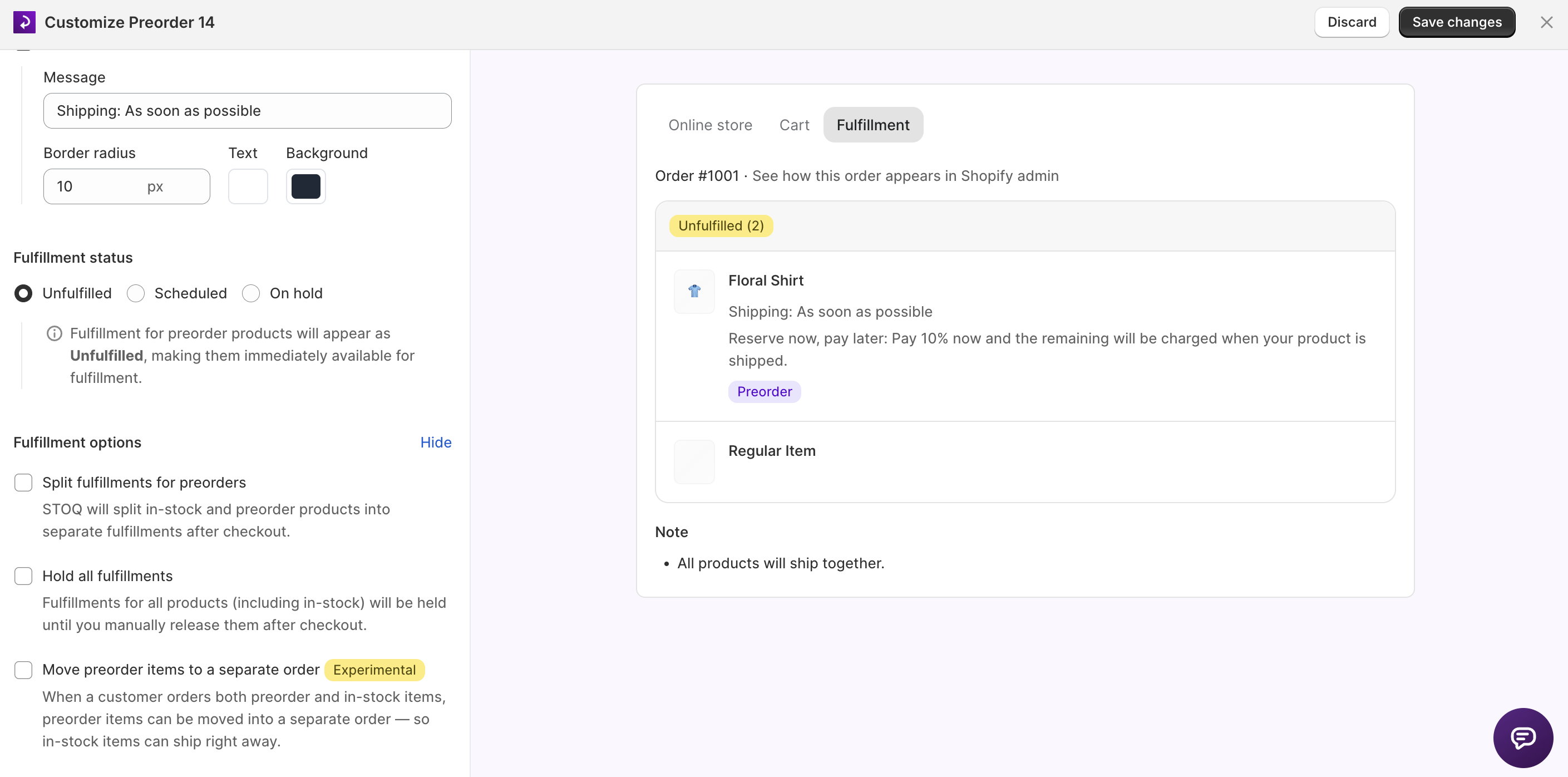
The order now mixes an in-stock gift with a preorder, so tell STOQ how to fulfill it. In Preorders → Offers → your offer → Shipping → Fulfillment options, pick the setting that matches the ship-timing decision you made earlier: Hold all fulfillment to keep the whole order together until the preorder ships, or leave in-stock items free to fulfill now if the gift ships immediately.
5. Run a test checkout
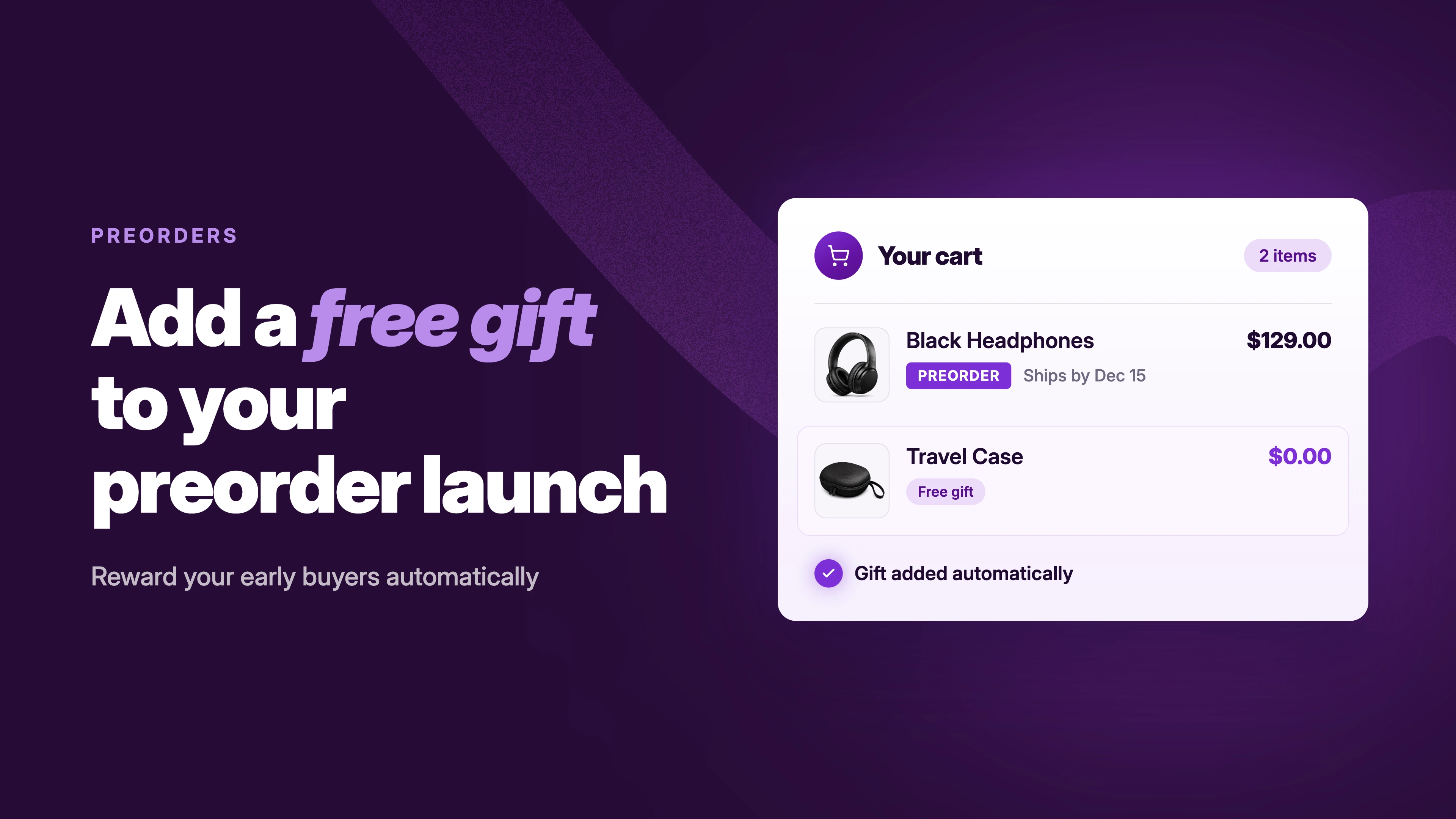
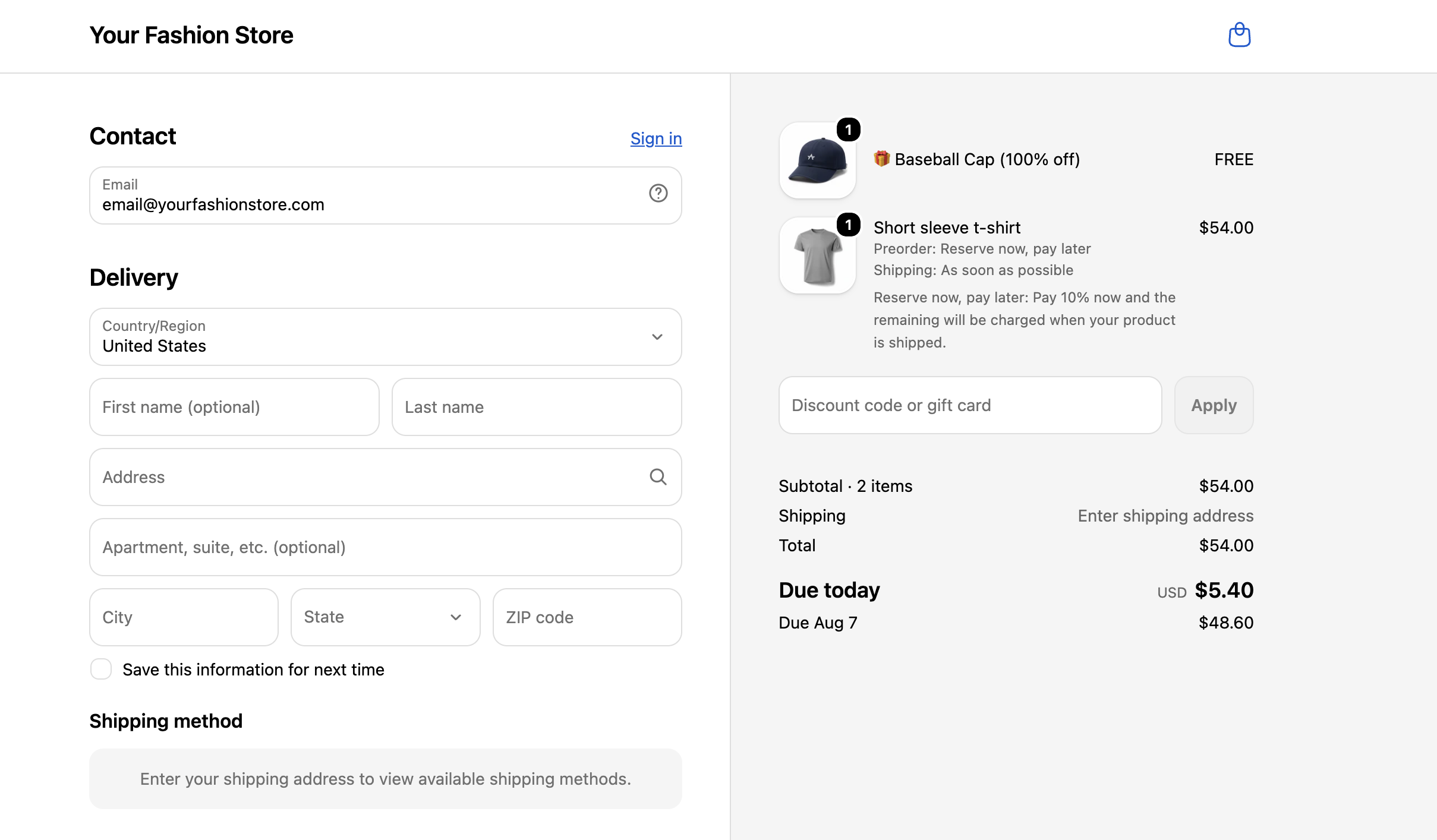
Add the preorder to the cart, confirm the gift adds itself, and check the line items. In our testing this worked as expected: the gift auto-added to a cart containing a preorder item, and the preorder selling plan carried through checkout with the gift present.
Depending on your app's configuration, some additional setup may be required, such as disabling selling plan support. If you run into any issues, our support team is available 24/7 to help you get everything working.
Quick note: the gift and the preorder are separate line items with separate fulfillment timing. Shopify knows that. Your customer doesn't, unless you tell them.
What customers need to see
Every preorder page needs three clarity lines: what ships when, what's charged when, and how many shipments to expect. A gift adds a fourth timing to the order, so those lines have to cover it too.
Product page: The gift offer and its ship timing sit next to the preorder badge, not in a popup or a footnote. The whole offer in one line: "Free [gift] ships immediately. Your [product] ships by [date]." Or, if shipping together: "Free [gift] included — ships with your [product] by [date]."
Cart and checkout: The gift appears as its own line item, so repeat the timing there. A one-line cart note ("Items in this order ship at different times" or "Everything ships together by [date]") answers the question before it's asked — BOGOS's Cart message option, in the offer's advanced configuration, is a ready-made place for it.
Order confirmation: STOQ carries the preorder details onto the confirmation email; the gift's timing line comes from your copy. Make sure both items show their timing, because the confirmation email is the page customers actually re-read while they wait.
The test for all of it: if a customer could reasonably email you asking "where's my gift?", the page copy hasn't done its job yet.
Things to keep in mind
- Cap the gift to real inventory. A "free gift" that quietly disappears mid-campaign reads as bait-and-switch, and early customers are exactly the ones who'll notice.
- The mixed-cart setting will fight your gift. If you use STOQ's "Don't allow mixed cart orders" restriction, an in-stock gift counts as a regular product and can break checkout when it auto-adds. Exclude the gift product from the restriction (by product or by tag), or leave mixed carts allowed for the campaign.
- Align shipping profiles before launch. If the gift ships now and the preorder ships later, misaligned profiles can double-charge shipping at checkout. Test it.
- The Shop app won't show preorder details. Preorders run on Shopify selling plans, which don't display in the Shop app, and the gift offer doesn't change that. Keep your own emails as the source of truth.
- If the ship date slips, the gift promise slips with it. Decide in advance: does the gift wait with the product, or ship immediately as a goodwill gesture? Either works. Silence doesn't. Tell customers before they ask.
- End the offer the way you announced it. Decide what happens to carts built before the window closes, and don't quietly extend a "limited" offer. The customers who bought early on your deadline will notice if the deadline meant nothing.
The takeaway
A free gift solves the quiet problem at the center of every preorder: you're asking people to order now and wait. Make the wait worth something, decide once when the gift ships, and write that decision on the product page in one line. Do that and the gift sells the preorder for you, and you never had to discount the launch product to do it.
Running a preorder launch? Install STOQ from the Shopify App Store and pair it with BOGOS for the gift layer.
Already using STOQ? Read the help guide on preorder offers to get the launch product set up first.
FAQs
Can I offer a free gift with a preorder product on Shopify?
Yes. Set the product up for preorder, then create a gift offer triggered by that product or by a cart threshold. The gift adds itself to the cart and checks out alongside the preorder. We've tested this pairing with STOQ and BOGOS.
When should the free gift ship — now or with the preorder?
Ship it now if the wait is long and you want customers holding something while they wait. Ship it with the preorder if you want one shipment and lower cost. Either works; what matters is saying which one it is on the product page.
Does the gift work if the cart mixes preorder and in-stock items?
Yes. In our testing, the gift applied correctly to mixed carts, and the preorder selling plan carried through checkout. One exception: if you've enabled "Don't allow mixed cart orders" in STOQ, exclude the gift product from that restriction first.
What happens if the gift runs out before the campaign ends?
Don't let it happen silently. Cap the offer to gift stock, or switch to a gift you can't run out of (a digital add-on works). If stock does run short mid-campaign, update the page the same day.

Anaam heads Merchant Success at Artos Software, working with Shopify merchants to help them unlock the full potential of STOQ and our other apps.