Your waitlist is your best ad audience: from Notify Me to Meta retargeting
A waitlist can end up doing just one job: the product comes back, the restock email goes out, and the list goes quiet until the next sell-out.
A waitlist signup tells you which product a shopper wants, often down to the size or color, and gives you a way to reach them. That makes it the most specific audience you have for retargeting that product.
But a signup signals interest, not a guaranteed purchase. Pay for ads only where they reach people your restock emails and texts don't, because the people on a waitlist are the ones most likely to buy anyway.
Used that way, a waitlist stops being a queue for one email and becomes a sequence:
1. Capture interest when a product sells out
When a product sells out, give shoppers a way to register interest instead of leaving them with a "Sold out" button. Add the signup form to product pages and, where supported, collection pages or quick-view windows.
If you're running Meta ads, you can also optimize campaigns for waitlist signups, so Meta looks for more people likely to join. Judge those campaigns by how many of the signups go on to buy. A cheap signup that never buys is still a cost.
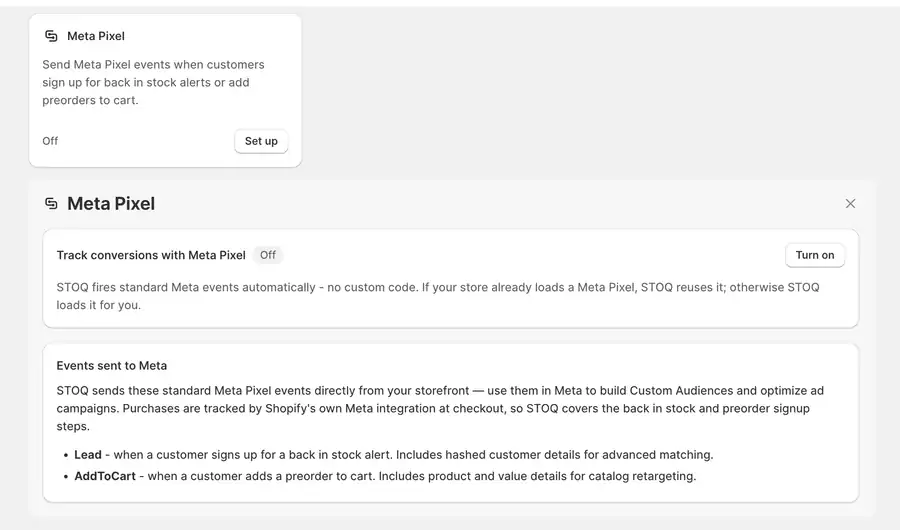
Turn tracking on before the list grows. Signups from before that point are never sent.
In STOQ: turn on Meta Pixel under Back in stock alerts → Settings → Integrations. STOQ sends a Lead event to Meta each time someone joins a waitlist (paid plan). → Track signups and preorders with Meta Pixel
2. Enrich each signup with what you'll need to target it
Each waitlist signup can carry the product, variant, signup date and market information. Sync this data to your email platform or Shopify customer list so you can use it when building segments.
Add a marketing consent checkbox if you plan to use signup data for broader marketing. If you use Klaviyo to send your restock alerts, check STOQ's Auto-subscribe signups to marketing setting in the Send emails through panel. It's enabled by default and subscribes synced Klaviyo profiles to marketing so your flows can deliver emails. Make sure this behavior aligns with the consent collected on your Notify Me form before using those profiles for broader marketing or customer-list audiences.
Collect names if you need them for personalization or audience matching. Double opt-in confirms access to an email address, but some shoppers won't complete the extra step.
If you sell in more than one market, use country where it's available to adjust restock and launch messages for each market.
In STOQ: consent, name and double opt-in are Notify Me form settings; the syncs and profile tag are on the Integrations page.
3. Build audiences by what people want, not who they are
A waitlist lets you group shoppers by the product they're interested in, how long they've been waiting, or whether they've already purchased. The useful segments depend on which signup fields your integration makes available and how you build the audience.
The Tartan Blanket Co. builds audiences like this. In the brand's case study:
"Once a cohort of interested buyers is captured in a flow, TBCo can look back and target them with highly relevant marketing campaigns later on."
→ Read the Tartan Blanket Co. case study
Choose website events or customer lists
There are two ways to build Meta audiences from waitlist signups: website events and customer lists. Website-event audiences come from the Lead events your store sends, so they miss shoppers who decline tracking or use an ad blocker. Customer-list audiences come from the signups you sync, so they only include people Meta can match to an account.
Use consented signups for customer lists
Customer-list audiences come with rules. Syncing a customer list to Meta means confirming you have the right and a lawful basis to use that data for ads, and that it leaves out anyone who opted out. That's why you collected consent at stage 2: use only consented signups for list-based audiences unless you've confirmed otherwise. This isn't legal advice, so check the rules where you sell. → Meta's Custom Audience terms
Combine small waitlists into a category
Audience size is another constraint. Klaviyo's guidance requires at least 100 profiles in a list or segment to create a custom audience sync, but Meta may match fewer people than your list contains. If one product's waitlist is too small, consider combining related waitlists into a broader category audience. → Klaviyo, "Integrate Facebook Advertising with Klaviyo"
Test signup and buyer lookalikes
The lookalike comes with its own trade-off. Signups are interest, so a lookalike seeded from them finds people who are interested. A seed of people who actually bought from your restock alerts may find better prospects, if you have enough of them. Test both.
4. Warm shoppers up while they wait, and pay only where email can't reach
Keep shoppers informed while they wait. Send a signup confirmation and share restock or shipping updates when you have them.
Ads can help when the wait is long, people aren't opening your emails, or you're building demand ahead of a preorder window. Otherwise, email and text them first. You can already reach these people for free.
If you run ads, send shoppers to a page where they can join the waitlist or place a preorder if it's available. A sold-out page with no next step wastes the click. Watch how often the same people see the same ad, because small audiences tire of it quickly.
5. Notify them when stock returns, then measure what the ads added
Send the alert before any ad
When stock returns, send your restock email or SMS first. Give it time to work before you pay to reach the same people with ads. If you send notifications in batches, wait until the relevant batch has been notified.
Advertise to people who didn't buy
Once the notification has gone out, retarget shoppers who signed up but haven't purchased. Exclude anyone who has already ordered.
STOQ's Notifications sent report includes a Without orders filter that shows shoppers who received a notification but haven't placed an order. On supported paid plans, you can export this list to build the audience.
If the product returns as a preorder rather than available stock, send ad clicks to the product page on your online store. This lets shoppers review the preorder terms before buying. Avoid sending them to a channel's own checkout, such as Facebook & Instagram checkout, where the order goes through as a normal order without your preorder terms.
Check what the ads really added
Meta may attribute an order to an ad even if the shopper would have purchased after receiving a restock email. To estimate how many additional purchases your ads generate, compare shoppers who see the ads with a similar group who don't.
For example, randomly split 1,600 eligible signups into two groups:
After 14 days, suppose 18% of the ad group and 15% of the holdout group have purchased. That's a 3-point difference, or about 38 extra buyers among the 1,280 shoppers in the ad group.
Treat the 38 as an estimate. It only holds if you assign shoppers randomly and send both groups the same emails and texts at the same times. Small lists can produce noisy results, so consider pooling data across multiple restocks. The cost: shoppers in the holdout don't see your ads while the test runs.
If the ads add little or nothing, move that budget to audiences who haven't already told you they want the product.
The takeaway
Every signup is a shopper telling you exactly what they want. That's worth more than one restock email.
Start by tracking signups, recording the data and consent you need, and grouping shoppers by product interest. Use email and SMS first, then test whether retargeting brings in additional purchases.
Running Meta ads? Install STOQ from the Shopify App Store to track waitlist signups with Meta Pixel and sync signup data with Klaviyo or Shopify.
Already using STOQ? Follow the guide to track signups and preorders with Meta Pixel.
FAQs
Can I retarget back in stock signups on Facebook and Instagram?
Yes. STOQ sends a Meta Pixel Lead event when someone signs up for back-in-stock alerts, which you can use to build a website-based audience. You can also sync signup data through Klaviyo or Shopify to create a customer-list audience in Meta. Each method has its own consent requirements, and both must follow Meta's policies.
How big does a waitlist need to be for a Meta custom audience?
Klaviyo's guidance requires at least 100 profiles in a list or segment to create a custom audience sync. Meta may match fewer people than your list contains. If one product's waitlist is too small, consider combining related waitlists into a broader category audience.
Do I need marketing consent to advertise to my waitlist?
A Notify Me signup doesn't automatically mean someone has agreed to every type of marketing. Before uploading customer data to Meta, make sure you have the appropriate rights and lawful basis to use it for advertising, exclude people who have opted out where required, and follow the rules that apply in the markets where you sell. Tracking through the Meta Pixel has separate consent and privacy considerations.
Should I run ads at the same time as the restock email?
Usually, send the restock email or SMS first and give shoppers time to purchase. Then retarget signups who haven't bought, excluding existing purchasers. If you send alerts in batches, time your ads to the relevant batch rather than advertising to the entire waitlist at once.
How do I know the ads worked?
Use a holdout test: randomly exclude part of your eligible signups from the ads and send both groups the same emails or SMS. Compare their purchase rates over the same period to estimate the additional sales associated with the ads. The result can be noisy with small audiences, and Meta's reported conversions may overlap with orders attributed to your restock alerts.

Ram leads SEO at Artos Software, optimizing discoverability for STOQ and our portfolio of Shopify apps across Google, AI search, and LLMs.