4 Ways to collect payment for preorders on Shopify (and how to choose)
A preorder separates the order from the shipment. What most merchants don't clock until launch week: it also separates the order from the payment and now you're making a decision a normal product never asks of you. When does the customer actually pay?
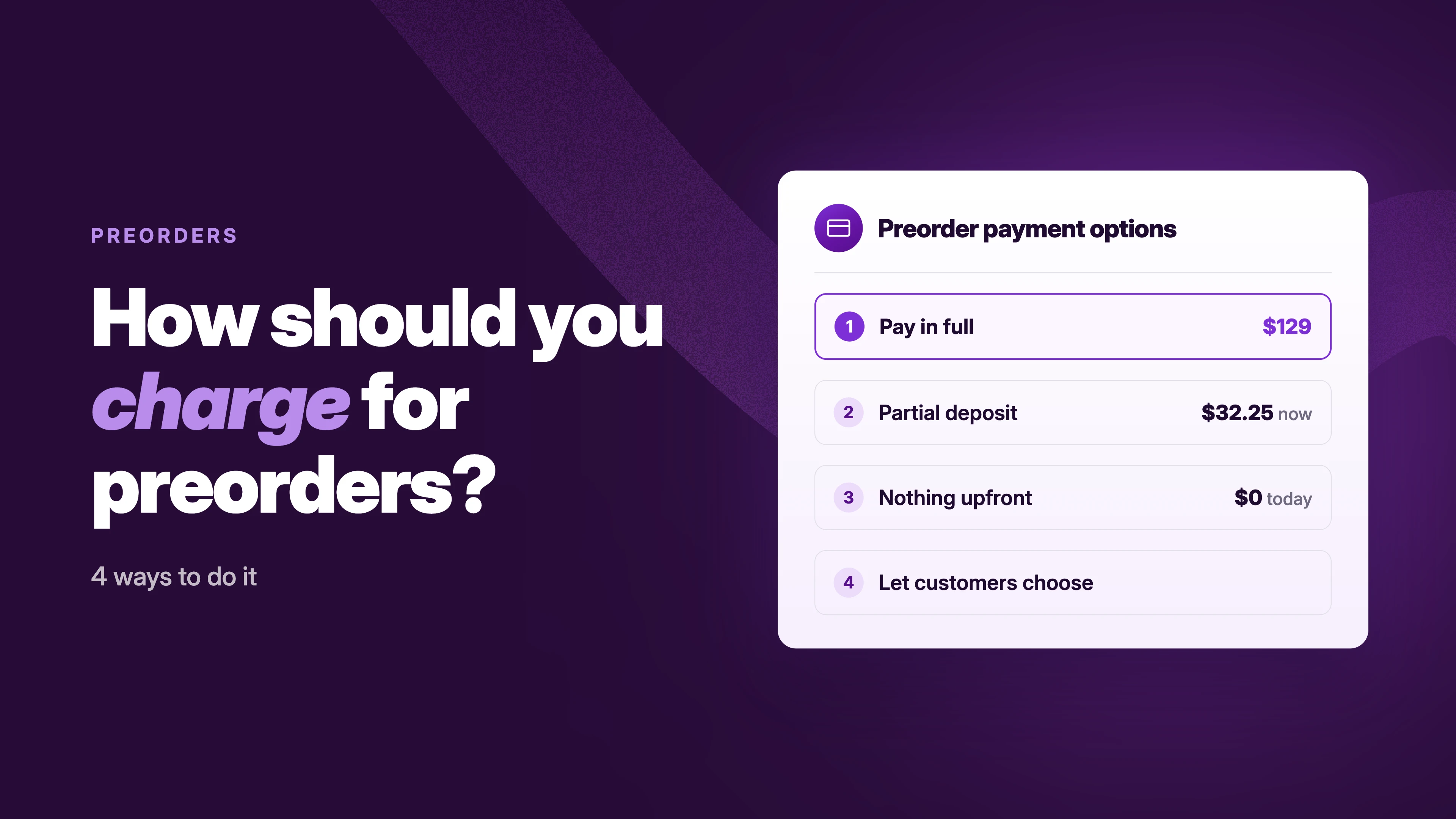
There are four ways to collect payment for preorders: full payment at checkout, a partial payment (deposit) with the balance collected later, no upfront payment where the saved card is charged when the order ships, or letting customers choose between options at checkout.
None of them is right for every store. This post compares all four, gives you the five questions that decide which one fits and covers the two things merchants skip and regret: gateway compatibility and the plan for collecting money later.
The four ways to collect payment for preorders, compared
Full payment
The customer pays the entire amount when they place the preorder. You have the revenue immediately, there's nothing to chase later and no failed charge waiting for you weeks down the line.
The tradeoff: it asks the customer for the biggest commitment. For a $20 t-shirt or a hyped drop, nobody thinks twice. For a $500 piece of furniture shipping in three months, paying everything today is friction and it shows up as abandoned checkouts.
One thing to check before you default here: if you sell into regions like the EU, review the consumer-protection rules where your customers are before collecting full payment for items you can't ship yet.
Partial payment (deposit)
The customer pays part of the order today — a percentage or a fixed amount — and the remaining balance later. For many stores this is the balance point: the customer commits without paying everything and you still secure the order and some of the cash.
The tradeoff is the second half of the transaction. You now need a plan for collecting the balance and the longer the timeline, the more failed attempts you'll see. Cards expire. Limits change. Shopify stores the customer's payment method securely at checkout (card vaulting), so collecting later doesn't mean invoicing from scratch: you charge the saved card automatically on a date or at fulfillment, or manually when stock lands. In STOQ: collect remaining balances per order or in bulk from Reports, with automatic customer notifications when a charge fails.
We have also discussed deposits in detail — amounts, refund policy, page messaging: the full guide to preorder deposits. And when it's time to charge the balance: how to collect remaining preorder payments.
No upfront payment (charge when it ships)
The customer reserves the product today and pays nothing at checkout. Their payment method is saved and the charge runs later — on a set date, or automatically when you fulfill the order. Nothing stands between the customer and the reserve button, so this converts the most signups and gives you the truest read on demand.
This is a real question we hear from merchants: “We cannot charge a customer’s card before shipping the item, so no partial payment.”
Worth being precise about the mechanics, because merchants ask support this weekly: this is not an authorization hold. No amount is reserved on the customer's card. Shopify vaults the payment method and the later charge is a fresh attempt — which can fail like any charge.
That's the tradeoff: a $0 reservation is a raised hand, not a sale. Expect more cancellations and more failed charges than any other option, because nothing was ever at stake for the customer. It fits when your launch date is still uncertain, inventory timelines aren't final, or the goal is measuring demand before you commit to production.
And if even a saved card is more commitment than the situation calls for — no dates, no confirmed production — that's a waitlist, not a preorder.
Let customers choose
Instead of picking one option, you offer two at checkout — typically full payment or a deposit — and the customer picks what they're comfortable with. Some customers would rather pay everything now and forget about it; others want to hold their money until the product ships.
The tradeoff is clarity. Two payment options on one product page means your messaging works twice as hard: what am I paying today, what will I pay later and when? Get that wording wrong and you've traded checkout friction for support tickets. It fits premium products, stores with distinct customer segments and merchants who want to find out which option their customers actually prefer.
Quick note: Customer choice payment option (Full payment & partial payment) and automatic balance collection both require a paid STOQ plan — free plan merchants only get manual collection.
How to choose: five questions
The four options trade the same three things against each other: conversion, cash flow and customer commitment. These five questions tell you which trade your store should make. Take them in order.
1. What does the product cost?
Under ~$50, payment friction barely exists — full payment costs you almost nothing in lost orders. As the price climbs, so does the number of customers who abandon checkout rather than pay everything today and deposits start paying for themselves in completed orders.
2. How long will customers wait?
A two-week gap between payment and shipping is a non-event. A four-month gap changes everything: more time for cards to expire, for customers to forget what they agreed to, for disputes. The longer the wait, the stronger the case for a deposit (less money held against a distant promise) and the more your later-collection plan matters.
3. How confident are you in the date?
Inventory booked, timeline solid: taking full payment or a deposit is safe. Dates still moving, or testing demand before committing to production: collect less. A store holding full payment against a date that slips is holding refund requests.
4. Do you need the cash now?
If preorder revenue funds the production run or the inventory order, that points to full payment or a meaningful deposit. If cash flow isn't the constraint, you can afford whichever option converts best instead.
5. How much do customers trust you?
An established brand with a track record can ask for full payment on a four-month preorder and get it. A newer store asking the same is asking a stranger for a loan. Less trust, less upfront. Earn the rest by shipping on time.
The short version: cheap product, short wait, or strong brand → full payment. Expensive, long wait, or custom → deposit. Dates uncertain or testing demand → no upfront payment. Split customer base → let them choose.
Check your payment gateway before you commit
One requirement decides whether deposits and charge-later preorders are even available to you: Shopify's preorder purchase options only work with Shopify Payments.
Deferred collection works by vaulting the customer's card at checkout and charging it later and that vault-and-charge flow is what most local and third-party gateways don't support. On an unsupported gateway, partial and no-upfront preorders can fail at checkout or silently not appear. This is a Shopify platform requirement — no preorder app routes around it. Full payment has no such restriction: it's a normal checkout and works with any gateway, so if you're locked into a regional gateway, full payment is your option by default.
Two narrower edges support sees merchants hit:
- Shopify's B2B checkout doesn't support the selling plans that partial payments run on — B2B customers are charged in full even when a deposit offer is live on the product
- Managed Markets international orders don't support partial-payment preorders; those customers need full payment
If either applies to your store, test a checkout from that flow before launch, not after.
Setting the payment option up in STOQ
The payment option is one setting inside your preorder offer, so this assumes preorders are already running. (Starting from zero? The full walkthrough: how to set up preorders on Shopify)
- In STOQ, open your Preorder offer, click Customize and open the Payment tab
- Pick the option: Full payment · Partial payment or deposit — set a percentage or fixed amount under "Customers pay now" · or Full payment & partial payment to let customers choose
- For charge-when-it-ships, under Customers pay now select No upfront payment, then under balance collection select Collect it automatically, when the order ships or on a scheduled date.
- The payment widget on your product page updates as you save, so customers see what they pay today and what comes later — and checkout shows the due date for any balance
Orders and outstanding balances live in Reports: payment status per order, single or bulk collection, failed-charge notifications. And because the payment option is an offer setting, you can switch between campaigns without rebuilding anything — run full payment on the spring drop, test deposits on the fall one, compare.
The mistakes that create support tickets
Matching the option to your preference instead of the product. No-upfront reservations on expensive custom products means production risk with zero customer commitment; full payment on a four-month unconfirmed timeline means refund pressure. The product, the wait and the customer decide — not what sounds best in the settings screen.
Leaving "what do I pay today?" unanswered. If a customer can't tell what they're paying now, what they'll pay later and when — on the product page and at checkout — the confusion arrives in your inbox as tickets, abandoned checkouts and disputes. This goes double when customers can choose between options.
Skipping the gateway check. Enabling a deposit offer on a gateway that doesn't support deferred payments is a checkout failure you'll discover from customer complaints. Check first. It takes one test order.
Having no plan for the later collection. Every option except full payment ends with you charging saved cards weeks later and some of those charges will fail. Decide upfront: automatic or manual, what the retry looks like and what you tell the customer whose card bounced. One caveat worth knowing if you collect at fulfillment: the charge attempt runs when you mark the order fulfilled, so a failed payment lands after the product has shipped. If that risk is unacceptable, collect before you ship.
FAQ
What are the different ways to collect payment for preorders?
Four: full payment at checkout, a partial payment (deposit) with the balance collected later, no upfront payment where the saved card is charged when the order ships, or offering customers a choice between full and partial payment at checkout.
Can customers reserve a preorder and only be charged when the item is available?
Yes — set the upfront payment to $0 and the saved card is charged automatically when the order is fulfilled. It's not an authorization hold; nothing is reserved on the card. This requires Shopify Payments.
How does Shopify charge customers later without me storing card details?
Shopify vaults the payment method securely at checkout as part of its preorder purchase options. You never handle card data — you (or your preorder app) trigger the charge on the saved method, automatically on a date or at fulfillment, or manually.
Which payment gateways support preorder deposits and charge-later payments?
Shopify Payments. Most local and third-party gateways don't support the vault-and-charge flow, in that case full payment at checkout is the only preorder option available.
What should a preorder app handle for charge-later payments?
Deposit options (percentage or fixed), automatic and manual balance collection, bulk collection when stock lands, failed-payment notifications with retry and clear customer-facing payment terms on the product page and at checkout.
How do I collect the remaining balance when inventory arrives?
Charge the saved payment method — automatically on the scheduled date or at fulfillment, or manually per order or in bulk from your preorder app when stock lands. Full walkthrough: how to collect remaining payment for preorders.
The takeaway
Collecting preorder payment is a trade between conversion, cash flow and commitment. Full payment maximizes certainty, no-upfront maximizes signups, deposits sit between and customer choice hands the decision to the buyer. Answer the five questions, confirm your gateway supports the option you picked and write down the later-collection plan before the first order — not after the first failed charge.
Running preorders and want deposits, charge-later and payment collection in one place? Install STOQ from the Shopify App Store Already using STOQ? Here's the help guide: preorder payment settings to configure yours.

Sandesh is the founder of Artos Software and product strategist behind STOQ, helping Shopify merchants recover lost revenue through preorders and back-in-stock alerts. Previously a Product Manager at Shopify and Dropbox, he’s spent over a decade building software that solves real problems for real people.